
Genstory vs Refbox
Side-by-side comparison to help you choose the right tool.

Genstory
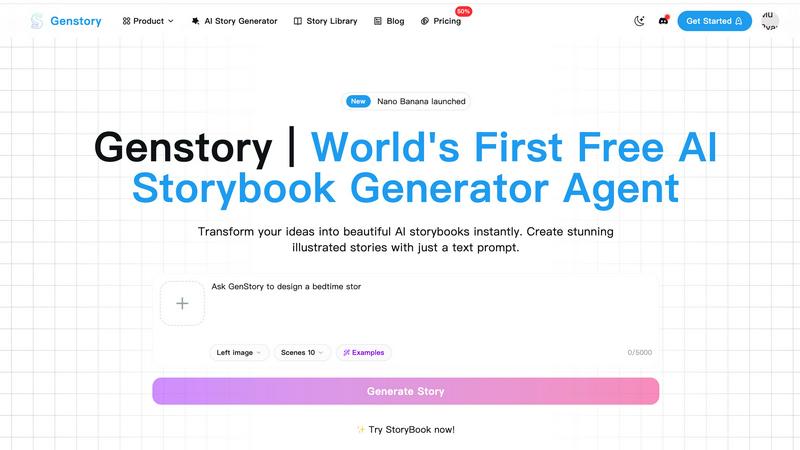
Genstory evolves your ideas into fully illustrated AI storybooks with just a single text prompt.
Last updated: February 27, 2026

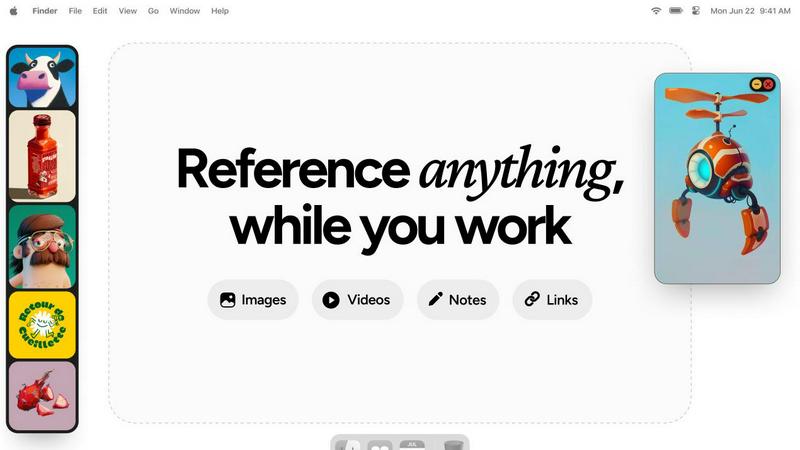
Refbox evolves your workflow by keeping references floating above your workspace for instant access.
Last updated: February 28, 2026
Visual Comparison
Genstory
Refbox
Feature Comparison
Genstory
Lightning-Fast AI Generation
Witness the rapid evolution of your idea from a simple prompt to a complete storybook. The advanced AI engine processes your input and executes the entire creation pipeline—writing narrative text and generating all illustrations—in a matter of seconds. This feature accelerates the creative process, allowing for iterative experimentation and instant gratification, turning moments of inspiration into tangible stories without delay.
Intuitive Natural Language Interface
The platform is designed for seamless progression from thought to creation. There is no need to learn complex commands or coding. You guide the AI's creative journey through straightforward, natural conversation. Simply describe your story idea, characters, or theme as if you were talking to a collaborator, and the AI interprets your vision to begin the story-building process, making advanced technology accessible to everyone.
Multi-Dimensional Output Formats
As your story reaches its final stage of development, Genstory provides flexible output options to suit your sharing goals. You can generate a standard PDF document for easy printing or digital sharing, or create an interactive web story for a more dynamic, online reading experience. This adaptability ensures your created content can evolve beyond the platform and into the hands of your audience in the most effective format.
Rich Library of AI-Generated Illustrations
Each story is brought to life with a suite of unique, AI-generated artwork. The technology creates visually stunning and contextually relevant illustrations for every scene, ensuring the visual narrative progresses in harmony with the text. This feature elevates the storybook from a simple document to a captivating visual journey, enhancing engagement and immersion for readers of all ages.
Refbox
Always-on-Top Floating Frames
This foundational feature allows you to pin any reference—images, videos, GIFs, or notes—into individual frames that float above all other application windows. You can resize, reposition, and minimize these frames with ease, ensuring your key sources of inspiration are always visible as you sketch, design, or animate. This eliminates constant window-switching, a major workflow interruption, and keeps your focus locked on creation.
Masonry Mode & Desktop Canvas
Refbox offers a unique, organized sidebar that displays your references in a dynamic Masonry layout. From here, you can drag and drop items directly onto your desktop, creating a customizable, infinite canvas of inspiration. This mode is perfect for building mood boards, arranging storyboards, or simply keeping a collection of related visuals within easy reach and sight, all without leaving your creative environment.
Markdown-Enabled Notes & Checklists
Beyond visual media, Refbox integrates powerful note-taking directly into your reference ecosystem. Create notes with markdown support for styling, and even embed checklists for project to-dos or step-by-step instructions. This consolidates your workflow by removing the need for a separate note-taking app, keeping your creative briefs, ideas, and action items pinned right alongside your visual references.
Advanced Media Controls
Refbox provides deep control over your reference media. Scrub through videos and GIFs frame-by-frame for detailed study, perfect for animators and motion designers. Capture website screenshots by simply pasting a URL, crop images to focus on specific details, pick colors directly from any pinned media, and view SVG files as images. These professional-grade tools save hours of manual work in other applications.
Use Cases
Genstory
Personalized Bedtime Story Creation
Parents can progress from a child's simple wish to a custom-crafted adventure in one evening. Create stories where your child is the hero, incorporate their favorite toys or animals as characters, and explore themes that resonate with them. This use case transforms routine bedtime into a unique bonding experience and fosters a lifelong love for stories and creativity, with a new tale always just a prompt away.
Dynamic Educational Content Development
Educators and teachers can evolve standard lesson plans into engaging visual narratives. Generate stories to explain complex concepts, create social scenarios for discussion, or develop tailored reading materials for different learning levels. This is particularly powerful for ESL instruction, special education, and sparking inspiration in creative writing classes, making educational content more accessible and memorable.
Creative Writing and Prototyping
Aspiring authors and content creators can use Genstory as a prototyping tool to rapidly visualize story concepts. Input a plot idea and quickly generate a visual storyboard with accompanying text to evaluate narrative flow, character dynamics, and thematic elements. This accelerates the early developmental stages of writing, allowing creators to iterate and refine their core ideas before committing to a full manuscript.
Specialized Thematic Storybooks
Progress from a specific theme or cultural element to a fully realized storybook. Users can generate stories for holidays, family traditions, to explain historical events, or celebrate personal milestones. This use case allows for the creation of highly specialized content that may not be readily available in mainstream publishing, providing a tool for preserving and sharing unique personal or cultural narratives.
Refbox
3D Modeling and Texturing
For 3D artists, maintaining visual consistency is crucial. Refbox allows you to pin reference images for textures, lighting, anatomy, and concept art directly over your 3D viewport. You can scrub through turntable videos frame-by-frame, pick colors from photos for materials, and keep modeling guidelines visible, all without ever leaving your modeling software, accelerating the entire sculpting and texturing process.
UI/UX Design and Development
Designers and developers can use Refbox to pin style guides, component libraries, and competitor screenshots for quick comparison. The floating frames ensure brand colors, spacing rules, and layout references are always in view while designing in Figma or coding in an IDE. Notes can hold hex codes and copy, while the gallery mode on a second monitor is perfect for reviewing full user flow mockups.
Digital Illustration and Concept Art
Illustrators and concept artists can build a dynamic mood board by dragging inspiration images directly onto their desktop canvas around their drawing software. They can lock a frame with a specific anatomical reference to draw over, use the color picker to sample palettes from photos, and keep narrative notes or client feedback pinned and visible throughout the entire sketching and painting phase.
Animation and Motion Graphics
Animators can pin sequential storyboard frames, character turnarounds, or video references in floating frames to study movement. The frame-by-frame scrubbing for GIFs and videos is indispensable for breaking down complex motions. Having these critical motion references always on top of the timeline in After Effects or Blender ensures accuracy and saves immense time otherwise spent switching back and forth.
Overview
About Genstory
Genstory represents a significant evolution in creative technology, progressing from a simple idea to a fully-fledged AI story generator agent. It is designed to transform the foundational spark of an idea into a complete, illustrated digital picture book in mere moments. Powered by advanced Gemini Storybook technology, it serves as a bridge between raw creativity and polished, shareable content. This tool is for anyone on a creative journey: parents seeking to craft unique bedtime adventures, educators aiming to develop engaging visual learning materials, or aspiring writers looking to visualize their narratives. Its core value proposition lies in democratizing the story creation process. By removing traditional barriers like the need for artistic skill, writing expertise, or complex software knowledge, Genstory empowers users to focus purely on imagination. The agent handles the entire developmental lifecycle of a story—from initial concept and plot structuring to generating vivid text and accompanying exquisite illustrations—culminating in a professional-grade storybook ready for sharing or printing.
About Refbox
Refbox represents a pivotal evolution in the creative workflow, transforming how professionals access and interact with their source material. It is a floating reference application designed to eliminate the disruptive cycle of alt-tabbing between folders, browsers, and creative software. By allowing users to pin images, GIFs, videos, and notes into always-on-top, resizable frames that hover directly over their workspace, Refbox ensures inspiration and critical information are perpetually in sight but never in the way. This tool is built for a new generation of creatives—graphic designers, 3D artists, animators, UI/UX developers, and photographers—who demand a frictionless process. Its core value proposition is profound: maintain your creative flow state. By removing the administrative friction of managing references, Refbox enables artists to progress from concept to execution with unprecedented speed and focus. It’s more than a utility; it's a digital companion that grows with your project, organizing visual chaos into an accessible, always-available library that sits seamlessly on top of your primary canvas, fostering a smoother, more intuitive, and deeply productive creative journey.
Frequently Asked Questions
Genstory FAQ
What kind of prompt should I give the AI?
Provide a clear, descriptive prompt in natural language for the best results. You can describe a character (e.g., "a shy robot who loves gardening"), a plot premise (e.g., "a mystery about a missing moon cheese"), a setting, or a specific lesson you want the story to teach. The more vivid your description, the more tailored and coherent the generated story and illustrations will be. You can start simple and evolve your prompts over time.
Can I customize the story after it is generated?
Yes, the creative process includes a review and customization stage. After the AI generates the initial storybook, you can read through the entire narrative and make adjustments to the text. While direct editing of individual AI-created illustrations is typically limited, you can guide the overall style and feel through your initial and subsequent prompts, allowing you to refine the story until it matches your vision.
What formats can I download my story in?
Genstory supports multi-dimensional output to suit the next stage of your story's journey. You can download your completed storybook as a standard PDF file, which is ideal for printing at home or through a professional service, or as an interactive web story, which provides an engaging online reading experience that is easy to share via a link on social media or messaging apps.
Is Genstory suitable for classroom use?
Absolutely. For educators, Genstory represents a progressive tool for creating engaging learning materials. It can be used to generate visual aids, create personalized reading materials at various comprehension levels, inspire creative writing exercises, and help explain abstract concepts through narrative. It's a versatile resource that supports the evolution of traditional teaching methods into more interactive and student-centered experiences.
Refbox FAQ
What types of files can I add to Refbox?
Refbox supports a wide range of media to fuel your creativity. You can directly add images (JPG, PNG, SVG, etc.), video files, and GIFs. You can also create text notes with markdown formatting. Additionally, you can import content by dragging from the web, your local file system, or even by pasting URLs to instantly capture website screenshots.
How does Refbox help with multi-monitor setups?
Refbox excels in multi-monitor environments. You can use the full-screen Gallery mode on a secondary monitor to display an entire collection of references like a digital mood board, leaving your primary screen completely free for your creative software. Floating frames can also be moved and resized across monitors, giving you flexible control over your reference placement.
Can I organize my references into different projects?
Yes, absolutely. Refbox allows you to create multiple, distinct Collections. You might have one collection for a client's branding project, another for a personal illustration, and another for tutorial resources. You can swap between these collections instantly with a single click or a keyboard shortcut, keeping your workspace organized and context-specific.
Is there a way to quickly hide Refbox when I don't need it?
Yes, Refbox is designed to be unobtrusive. You can set your main "Box" sidebar to auto-hide, so it only appears when you need to access your library. Individual floating frames can also be minimized to a small tab or managed with keyboard shortcuts, giving you full control to clear your screen and focus solely on your primary application when necessary.
Alternatives
Genstory Alternatives
Genstory is a free AI-powered creator that instantly generates illustrated storybooks, comics, and cinematic videos from simple text prompts. It falls into the category of AI-driven creative and design tools, specifically tailored for narrative and visual storytelling. Users often seek it out for quick, personalized content creation without needing technical skills. People explore alternatives to Genstory for various reasons. Some may require more advanced editing features, different artistic styles, or integration with other platforms. Others might be looking for tools focused on a specific output format, like long-form novels or professional-grade animation, or have needs related to team collaboration or commercial licensing. When evaluating other tools in this space, consider your primary goal. Key factors include the quality and consistency of AI-generated art, the depth of narrative control, output formats (like PDF, video, or interactive web), and of course, pricing models. The best choice aligns with whether you prioritize speed and simplicity for casual use or demand more granular creative control for professional projects.
Refbox Alternatives
Refbox is a specialized productivity tool designed for creatives, acting as a floating reference manager. It belongs to the category of workflow enhancement software, helping users keep images, videos, and notes visible above their primary workspace to streamline tasks like design and animation. Users often explore alternatives for various reasons. These can include budget constraints, the need for specific features Refbox may not offer, or compatibility requirements with different operating systems or creative suites. The search for the right tool is a natural part of evolving one's digital workspace. When evaluating an alternative, consider your core workflow needs. Key factors include the ability to pin reference windows, support for your primary media types, organizational features like collections or boards, and seamless integration with your existing tools. The goal is to find a solution that supports your creative growth without interrupting your process.