
Blueberry vs HookMesh
Side-by-side comparison to help you choose the right tool.

Blueberry
Blueberry is an AI-native workspace that unites your editor, terminal, and browser for seamless product development.
Last updated: February 28, 2026

HookMesh simplifies webhook delivery with reliable automation, retries, and a self-service portal for seamless.
Last updated: February 28, 2026
Visual Comparison
Blueberry

HookMesh
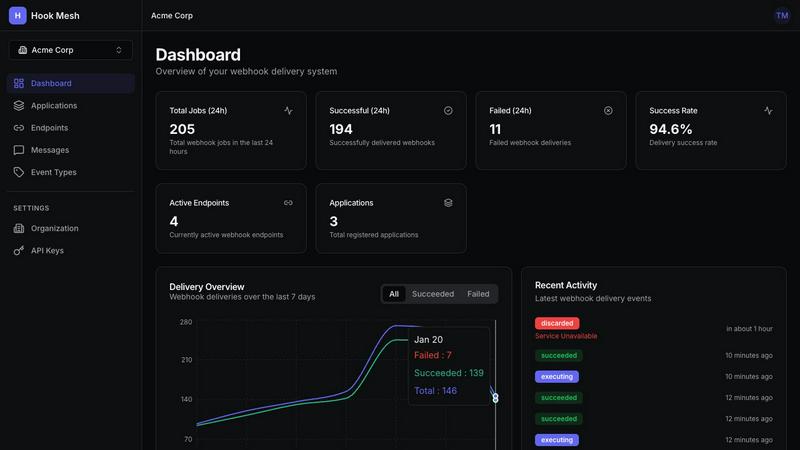
Feature Comparison
Blueberry
Unified AI-Native Workspace
Blueberry consolidates your essential development tools—editor, terminal, and browser—into a single, managed window. This foundational feature eliminates the cognitive load and time wasted on manually arranging and switching between disparate applications. The workspace is designed from the ground up to be AI-aware, ensuring that every component is accessible and contextual for integrated AI assistants, creating a seamless and focused development environment that feels intuitive and powerful.
Built-in MCP Server for Full AI Context
This is the engine of Blueberry's intelligence. The integrated Model Context Protocol (MCP) server acts as a bridge, giving your connected AI model (like Claude or Gemini) a live, real-time view of your entire project. The AI can see your code changes as you type, read terminal output, inspect the state of your preview browser, and interact with pinned apps. This means you can ask complex, contextual questions without ever copying a snippet of code or a screenshot manually.
Pinned Apps with Shared Context
Blueberry allows you to dock and pin essential web applications like GitHub, Linear, Figma, or PostHog directly within your workspace. These apps load with your project and, crucially, share the same live context with your AI via the MCP server. This transforms your task management, design review, and analytics tools from isolated silos into integrated parts of your development flow, keeping all relevant information at your fingertips.
Visual Context with Screenshot & Element Select
Beyond code, Blueberry empowers your AI with visual understanding. You can directly capture screenshots of your live application preview or use an element selector to highlight specific UI components. This visual context is fed directly to your AI assistant, enabling it to provide feedback on design, debug layout issues, or suggest changes based on exactly what you're seeing, bridging the gap between code and its visual outcome.
HookMesh
Reliable Delivery
HookMesh guarantees that webhook events are never lost. With automatic retries, it implements an exponential backoff strategy that intelligently spaces out retries over a period of up to 48 hours. This ensures that even in the face of temporary failures, your webhook messages are persistently sent until confirmed as received.
Circuit Breaker
The circuit breaker feature automatically disables failing endpoints to prevent them from clogging your webhook delivery queue. Once the issue is resolved, the endpoint can be re-enabled seamlessly. This proactive approach minimizes the risk of downtime affecting your entire system, allowing for more stable operations.
Customer Portal
HookMesh includes a self-service portal that empowers your customers to manage their webhook endpoints independently. This embeddable UI allows users to add new endpoints, review delivery logs for transparency, and replay failed deliveries with just a click. Such functionality enhances user experience and reduces the support burden on your team.
Developer Experience
Designed for a seamless developer experience, HookMesh offers a comprehensive REST API and official SDKs for JavaScript, Python, and Go. Developers can integrate webhook functionality in minutes with just a few lines of code. This simplicity accelerates deployment and allows teams to focus on product enhancements rather than technical hurdles.
Use Cases
Blueberry
Rapid Prototyping and Iteration
When building a new feature or prototyping an idea, developers can code in the editor, see instant updates in the live browser preview, and use the terminal to run servers or commands—all without leaving the window. The AI can suggest code, explain errors from the terminal, and critique the UI live, dramatically speeding up the iterative build-measure-learn cycle.
AI-Powered Debugging and Problem Solving
Instead of manually correlating error messages, code, and browser state, a developer can simply ask their AI assistant, "Why is this button not working?" The AI, with full context from the terminal logs, the relevant code file, and the current browser DOM, can diagnose the issue, suggest a fix, and even implement the correction directly, turning debugging from a scavenger hunt into a guided conversation.
Streamlined Code Reviews and Onboarding
A senior developer or team lead can use Blueberry to review a pull request. With the code, the running application, and the terminal output visible simultaneously, they can comprehensively understand the changes. They can ask the AI to explain complex logic, generate tests, or assess performance implications based on the full system context, making reviews more thorough and efficient.
Context-Rich AI Collaboration
Whether you're pair programming with an AI or using it as a brainstorming partner, Blueberry provides the shared context necessary for high-level collaboration. You can ask, "How can we improve the user flow from this page?" and the AI can analyze the current component code, the live UI, and any pinned design documents to provide a coherent, actionable suggestion that considers the entire product picture.
HookMesh
E-commerce Transactions
In the e-commerce sector, businesses can leverage HookMesh to reliably send order notifications and transaction updates to customer endpoints. This ensures customers receive timely information about their orders, which is crucial for enhancing customer satisfaction and retention.
SaaS Integration
SaaS platforms can utilize HookMesh to facilitate integrations with third-party services by delivering real-time event notifications. This capability allows for a more cohesive user experience and helps maintain data synchronization across different applications, improving overall functionality.
Marketing Automation
Marketing teams can use HookMesh to manage webhook deliveries for campaign triggers, such as customer sign-ups or abandoned cart reminders. By ensuring reliable and timely notifications, businesses can enhance their marketing effectiveness and engagement rates.
System Health Monitoring
Organizations can set up HookMesh to send alerts to their systems when certain thresholds are met or anomalies detected. This proactive monitoring allows teams to respond quickly to potential issues, thereby reducing downtime and improving operational reliability.
Overview
About Blueberry
Blueberry represents a pivotal evolution in the product development workflow, moving beyond the fragmented toolset of the past into a unified, AI-native workspace. It is a macOS application designed for modern product builders—developers, engineers, and creators—who are focused on shipping delightful web applications. The core value proposition is profound yet simple: stop juggling windows and start building in a single, focused environment. Blueberry seamlessly integrates the three core pillars of development—a full-featured code editor, a powerful terminal, and a live preview browser—into one cohesive interface. This integration is supercharged by its native AI capabilities. By connecting to models like Claude, Gemini, or Codex via its built-in MCP (Model Context Protocol) server, Blueberry grants your AI assistant live, omnipresent context over your entire workspace. It can see your open files, terminal output, browser state, and even pinned apps like Figma or Linear. This eliminates the tedious cycle of copying, pasting, and switching contexts, allowing builders to maintain flow state and accelerate from idea to execution. Currently in a free beta, Blueberry is not just another editor; it's the next-stage platform where your tools and your intelligence work in concert.
About HookMesh
HookMesh is a cutting-edge solution designed to streamline and optimize webhook delivery for contemporary SaaS products. In a world where seamless data communication is key, HookMesh alleviates the burdens associated with in-house webhook creation and management. Common challenges like implementing retry logic, configuring circuit breakers, and troubleshooting delivery failures can divert focus from core product development. With HookMesh, businesses can shift their attention back to innovation and growth, while relying on a robust platform that guarantees dependable webhook delivery. This solution employs battle-tested infrastructure that ensures events are delivered reliably through features like automatic retries, exponential backoff, and idempotency keys. HookMesh empowers developers and product teams to provide a flawless user experience, ensuring webhook events are consistently and reliably delivered. Moreover, the self-service portal enhances customer autonomy, enabling users to manage endpoints and effortlessly replay failed webhooks, making HookMesh an essential tool for organizations seeking to enhance their webhook strategy and operational efficiency.
Frequently Asked Questions
Blueberry FAQ
What is MCP and why is it important?
MCP stands for Model Context Protocol. It is a standard that allows AI models to securely connect to and interact with external tools and data sources. In Blueberry, the built-in MCP server is crucial because it safely exposes your live workspace—your files, browser, terminal, and pinned apps—to AI models like Claude. This gives the AI a deep, real-time understanding of your project, enabling it to provide relevant, contextual assistance without you manually feeding it information.
Is Blueberry just a code editor with a terminal split?
No, it is fundamentally different. While it includes a powerful editor and terminal, Blueberry is an integrated AI-native platform. The key difference is that all components are designed to work together and feed a central AI context. The editor, terminal, and browser are not just panels side-by-side; they are interconnected nodes that your AI assistant can see and interact with simultaneously, creating a unified intelligence layer over your entire development process.
Can I use my own AI models with Blueberry?
Yes. While Blueberry showcases integrations with popular models like Claude, Gemini, and Codex, its MCP server is designed to be compatible with any AI model that supports the Model Context Protocol. This open approach allows you to connect the AI tool of your choice, giving you flexibility while still benefiting from Blueberry's unified workspace and deep context-sharing capabilities.
What does "100% FREE DURING BETA" mean?
It means that while Blueberry is in its beta testing phase, all features and functionality are completely free to use. There is no cost to download, install, or use the application. This allows the development team to gather widespread feedback and refine the product. A pricing model for the stable, production version will likely be introduced after the beta period concludes, but beta users will have ample notice.
HookMesh FAQ
What types of payloads can I send with HookMesh?
HookMesh accepts any JSON payload, allowing for flexible data structures tailored to your application's needs. This versatility ensures that you can send the necessary information without limitations.
How does the automatic retry feature work?
The automatic retry feature employs an exponential backoff strategy with jitter, retrying failed webhook deliveries for up to 48 hours. This means that if a delivery fails, it will intelligently space out subsequent attempts to mitigate server overload and increase the chances of successful delivery.
Is there a limit on the number of endpoints I can create?
HookMesh allows for unlimited endpoint management, but specific pricing tiers may determine the number of webhook messages you can send monthly. The self-service portal enables you to manage these endpoints effortlessly.
Can I test webhooks before going live?
Yes, HookMesh provides a playground feature that allows developers to test and debug webhooks prior to deploying them in a production environment. This ensures that your webhook events function as intended, reducing the risk of errors post-launch.
Alternatives
Blueberry Alternatives
Blueberry is a macOS application designed for developers, creating a unified workspace that integrates the essential tools of an editor, terminal, and browser. This category of all-in-one development environments aims to streamline workflows by reducing context switching and window management overhead, allowing for a more focused and efficient coding process. Developers often explore alternatives to such tools for several practical reasons. These can include platform compatibility needs, as Blueberry is currently exclusive to macOS, or specific feature requirements not yet present. Others may seek different pricing models as a product evolves from a free beta, or simply prefer a different approach to UI and workflow integration that better matches their personal habits. When evaluating alternatives, consider the core promise of a cohesive workspace. Key factors include the depth and seamlessness of integration between your code, command line, and live preview, as well as the flexibility to connect with the AI models and tools that power your specific development cycle. The goal is to find a solution that minimizes friction and maximizes your focus, allowing you to progress from idea to execution with fewer interruptions.
HookMesh Alternatives
HookMesh is a cutting-edge solution designed to streamline webhook delivery for modern SaaS applications. By addressing the complexities of building and managing webhooks in-house, it enables developers and product teams to focus on core functionalities while ensuring reliable event delivery. As businesses evolve, users may seek alternatives to HookMesh for various reasons, including pricing, feature sets, or specific platform needs that better align with their operational goals. When choosing an alternative, it is essential to consider factors such as the reliability of delivery mechanisms, ease of use, customer support availability, and integration capabilities. A well-rounded solution should offer features that enhance the user experience, ensuring that webhook management is seamless and efficient, regardless of the chosen platform.