
Imgezy vs RemoveTexts
Side-by-side comparison to help you choose the right tool.

Imgezy
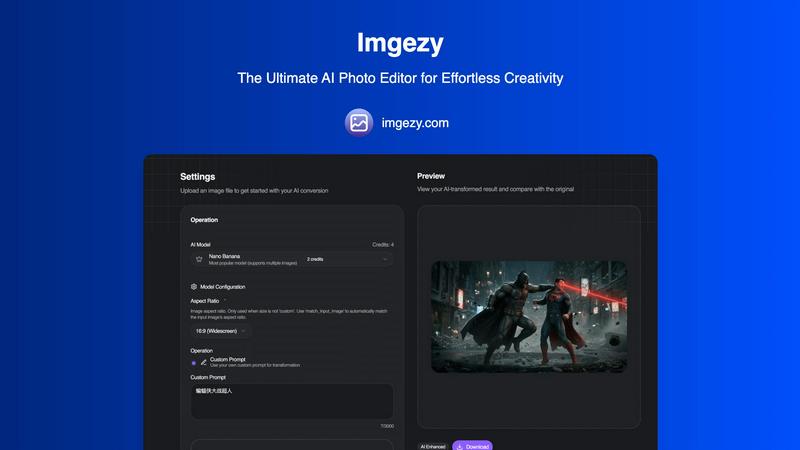
Imgezy is an AI photo editor that transforms images by removing objects and changing backgrounds effortlessly.
Last updated: February 28, 2026

RemoveTexts
RemoveTexts is an AI tool that effortlessly removes text and watermarks from images in seconds, requiring no design skills.
Last updated: March 11, 2026
Visual Comparison
Imgezy
RemoveTexts

Feature Comparison
Imgezy
Object Removal
Imgezy's object removal feature allows users to eliminate unwanted elements from their photos seamlessly. Whether it's distracting tourists, power lines, or photobombers, the AI intelligently identifies and removes these objects while reconstructing the background with pixel-perfect accuracy. This ensures that your images look clean and professional without any noticeable traces of the edits.
Background Replacement
With Imgezy, changing the background of your images has never been easier. Users can replace backgrounds instantly, choosing from solid colors to breathtaking landscapes. This feature allows for creative freedom, enabling users to transform the context of their photos dramatically and enhance the overall aesthetic.
Photo Enhancement
Imgezy offers automatic photo enhancement capabilities that improve the overall quality of your images. The AI enhances colors, adjusts lighting, and sharpens details, ensuring that your photos pop with vibrancy. This feature is perfect for anyone looking to elevate their images without extensive manual adjustments.
Batch Processing
For users working on large projects, Imgezy provides a batch processing feature that allows you to edit multiple photos simultaneously. This saves significant time and effort, making it an essential tool for professionals who need to manage high volumes of images efficiently.
RemoveTexts
Paint to Remove
This feature allows users to have precise control over the text removal process. Simply brush over the specific text areas you want to eliminate, and the AI will intelligently erase only those parts while reconstructing the background seamlessly.
Auto Remove All
For those who prefer a more automated approach, the Auto Remove All feature detects and removes every text element in an image with one click. This is particularly useful for users who want to clean up images quickly without manual selection.
Edit & Replace Text
With this feature, users can easily change existing text in images while matching the original style and font. This provides flexibility for creators who want to customize their visuals without starting from scratch.
Remove Objects
Beyond just text, this feature enables users to erase unwanted objects, logos, and visual elements from their images. This is ideal for enhancing the overall aesthetic of photos or eliminating distractions from the main subject.
Use Cases
Imgezy
Social Media Content Creation
Imgezy is ideal for social media influencers and content creators looking to enhance their visual presence. With its quick editing capabilities, users can produce eye-catching images that attract more engagement and followers, making their profiles stand out.
E-commerce Product Photography
Online retailers can leverage Imgezy to enhance product images for their catalogs. By removing distracting backgrounds and improving image quality, e-commerce businesses can present their products in the best light, ultimately boosting sales and conversions.
Personal Photo Editing
For individuals wanting to enhance their personal photos, Imgezy makes it easy to edit vacation snapshots, family portraits, and more. Users can quickly remove unwanted objects or change backgrounds to create memorable keepsakes without the need for advanced editing skills.
Marketing and Advertising
Imgezy serves as a powerful tool for marketers who need to create compelling visuals for campaigns. With the ability to produce high-quality images quickly, marketers can save time and resources while ensuring that their promotional materials are visually appealing and effective.
RemoveTexts
Cleaning Up Product Images
E-commerce sellers can use RemoveTexts to quickly eliminate watermarks and unwanted text from their product photos, ensuring clean and professional-looking images that attract buyers and enhance brand credibility.
Redacting Sensitive Information
Legal professionals often need to redact sensitive data from documents. RemoveTexts simplifies this process by allowing users to erase specific text elements from images, ensuring confidentiality while maintaining visual clarity.
Enhancing Social Media Content
Social media managers and content creators can benefit from RemoveTexts by removing distracting captions or watermarks from images, ultimately improving the quality of posts and visual engagement with their audience.
Customizing Memes and Graphics
Memers and graphic designers can use the tool to remove original text from memes or designs, allowing them to create unique variations or add their own messages while preserving the original image quality.
Overview
About Imgezy
Imgezy is the ultimate AI-powered photo editing tool that revolutionizes how users approach image enhancement. Whether you are an amateur enthusiast or a seasoned professional, Imgezy simplifies the photo editing journey, empowering you to create stunning visuals with just a few clicks. Its intuitive interface allows users to edit images using plain language commands, making it accessible for everyone, regardless of their design experience. The main value proposition of Imgezy lies in its ability to deliver professional-quality edits in mere seconds, eliminating the complexities often associated with traditional photo editing software. Trusted by over 200,000 users worldwide, Imgezy leverages advanced AI technology to perform tasks like object removal and background changes effortlessly. This innovative tool is designed to cater to a wide array of applications, from enhancing personal photos for social media to preparing high-quality images for commercial use. With Imgezy, everyone can unleash their creativity and achieve remarkable results.
About RemoveTexts
RemoveTexts is an innovative AI-powered image editing tool designed to effortlessly remove unwanted text from images. By leveraging advanced deep learning technology, this tool provides users with a seamless experience in cleaning up visuals without the need for complex software like Photoshop. Whether you are a marketer looking to eliminate watermarks from product images, a creator aiming to clean up memes, or simply someone wanting to remove subtitles or date stamps from photos, RemoveTexts is your go-to solution. The main value proposition lies in its simplicity and efficiency; users can upload their images, select the text they wish to remove, and receive professional-grade results within seconds. With no prior design skills required, RemoveTexts empowers over 100,000 users globally, making it an essential tool for anyone needing fast and reliable image editing capabilities.
Frequently Asked Questions
Imgezy FAQ
What types of images can I edit with Imgezy?
Imgezy supports all major image formats, including JPG, PNG, and WebP, allowing users to edit a wide variety of photos.
How long does it take to edit an image?
Imgezy's AI processes edits in seconds, enabling users to receive professional-quality results almost instantly without the need for extensive manual work.
Is there a limit to how many images I can edit?
The number of images you can edit depends on the plan you choose. Imgezy offers various subscription tiers that provide different credit limits for editing images.
Do I need any design skills to use Imgezy?
No, Imgezy is designed for users of all skill levels. You can edit your photos using simple language commands, making it accessible even for those without any design experience.
RemoveTexts FAQ
How does RemoveTexts work?
RemoveTexts utilizes advanced deep learning inpainting technology to analyze surrounding pixels and reconstruct the background after removing text. This results in a seamless and professional finish.
Is there a limit on the image size I can upload?
Yes, RemoveTexts supports image uploads in JPG, PNG, and WebP formats, with a maximum file size limit of 10 MB.
Do I need any design skills to use RemoveTexts?
No, RemoveTexts is designed for users of all skill levels. Its intuitive interface allows anyone to remove text and clean images without needing prior design experience.
Can I use RemoveTexts for commercial purposes?
Absolutely. Many users leverage RemoveTexts for commercial projects, including e-commerce, marketing materials, and social media content, making it a versatile tool for various industries.
Alternatives
Imgezy Alternatives
Imgezy is an innovative AI-powered photo editing tool that allows users to enhance their images with ease. It caters to a wide range of users, from casual photographers to professional creatives, by simplifying complex editing tasks and making them accessible through plain language commands. Despite its advanced features, users often seek alternatives for various reasons, including pricing considerations, specific feature requirements, or compatibility with different platforms. When searching for an alternative to Imgezy, it is essential to identify what features are most important to you, such as object removal capabilities, background editing options, or user interface design. Additionally, consider whether the tool fits your budget and meets your specific editing needs, ensuring it aligns with your creative goals.
RemoveTexts Alternatives
RemoveTexts is an innovative AI-powered tool designed for image editing, specifically focused on removing unwanted text from images in a matter of seconds. It streamlines the process of cleaning up visuals by eliminating distractions such as watermarks, subtitles, and branded overlays without the need for complex software like Photoshop. As users increasingly seek efficient solutions for image editing, they often find themselves exploring alternatives due to factors like pricing, user interface, or specific feature sets that may better suit their needs. When searching for an alternative to RemoveTexts, users should consider various aspects such as ease of use, the effectiveness of text removal, and the ability of the tool to maintain image quality. It's also crucial to evaluate the compatibility of the software with different platforms and the support for multiple languages, ensuring that the chosen solution aligns with individual requirements and preferences. A thoughtful selection can enhance the editing experience and yield better results.