
Proofapp vs SimpleDraw
Side-by-side comparison to help you choose the right tool.

Proofapp
Proofapp evolves feedback with visual comments pinned directly to your website.
Last updated: March 4, 2026

SimpleDraw
Evolve your home project from idea to precise scale drawing with our free, intuitive online tool.
Last updated: March 1, 2026
Visual Comparison
Proofapp

SimpleDraw
Feature Comparison
Proofapp
Visual Commenting
This foundational feature allows reviewers to click directly on any part of a captured website screenshot to leave precise, contextual feedback. This eliminates the frustrating and time-consuming back-and-forth of describing locations with words like "top left, under the nav." Comments are pinned visually, creating an unambiguous record of exactly what element is being discussed, which dramatically reduces revision cycles and ensures everyone is aligned from the very first comment.
Multi-Breakpoint Testing
Proofapp automatically captures and presents your website at both desktop and mobile breakpoints when you provide a URL. This critical feature ensures that feedback isn't limited to a single viewport, allowing teams to review and collaborate on the full user experience across devices. It streamlines the QA process, helping teams identify and resolve responsive design issues before launch, which is a key milestone in modern web development.
Real-time Collaboration & Notifications
The platform fosters a dynamic collaborative environment where team members and clients can see comments appear live. Coupled with instant notifications, this feature ensures the feedback loop is continuous and efficient. Users can reply within threads, attach supporting files, and resolve comments, tracking progress collectively without the need for manual status updates or refreshing the page, propelling projects forward smoothly.
Secure Share Links & Client Access
Proofapp simplifies client involvement by allowing you to generate secure, expirable links to share projects. Clients can view screenshots and leave detailed feedback without the friction of creating an account, lowering the barrier to participation. This professional approach not only enhances security but also streamlines the client review process, making it a seamless part of your evolved project workflow.
SimpleDraw
Dedicated Floor Plan Mode
This specialized mode marks a significant step forward in focused tooling. It provides a curated environment for architectural sketching, allowing users to draw walls and add pre-made symbols for doors, windows, and a vast library of interior fixtures with a single click. As you work, real-time measurements update dynamically, ensuring every element from kitchen cabinets to bathroom fittings is placed with spatial accuracy, streamlining the creation of detailed and professional-looking layouts.
Intelligent Smart Alignment System
SimpleDraw's smart alignment is the cornerstone of its user-friendly precision. This adaptive system intelligently snaps points and lines to logical positions, offering clear visual guides for perfect angles and connections. It learns from your zoom level, providing broader assistance for general layout and finer control when you zoom in for detail. For ultimate control, keyboard shortcuts let you lock movements to strict horizontal or vertical axes, making precise drafting effortless.
Non-Destructive Editing & Full Control
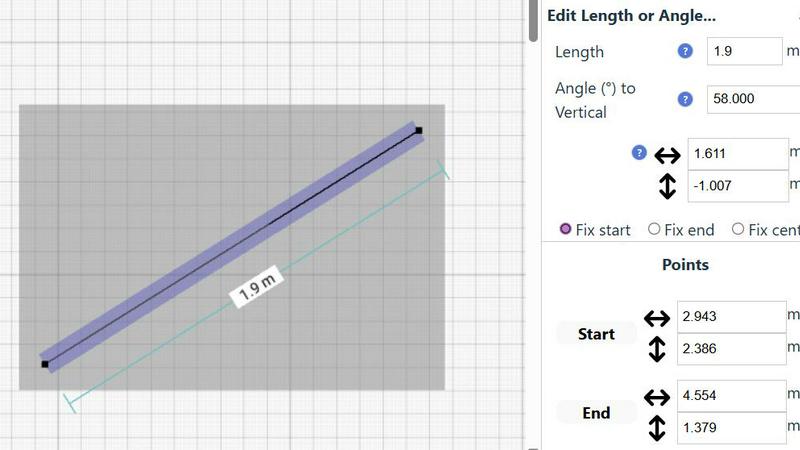
Embodying a flexible, progress-oriented workflow, SimpleDraw ensures no decision is permanent. Every element, from a single line to grouped furniture sets, can be modified, moved, or adjusted at any stage. Robust undo/redo functions and copy-paste capabilities for element groups streamline experimentation. Crucially, you can input exact dimensions, lengths, and angles directly via keyboard, allowing for meticulous refinement of plans based on real-world measurements.
Adaptive Zoom & Comprehensive Measurement
This feature duo provides unparalleled control over your drawing's scope and specificity. Zoom fluidly to any area, with the tool's precision adapting intuitively to your view. This is complemented by a comprehensive measurement system that displays contextual dimensions as you work. You have full control over which measurements are shown and can toggle between metric and US standard units, ensuring clarity and accuracy for any project, anywhere.
Use Cases
Proofapp
Freelancer Client Approvals
Freelancers can present their web design or development work professionally using Proofapp. By sharing a secure link, they collect clear, visual feedback directly on the site mockup or live build. This eliminates confusing email chains, saves hours typically spent deciphering notes, and presents a polished, efficient process that builds client trust and accelerates project finalization.
Agency Project Management
Marketing and design agencies managing multiple client projects use Proofapp to centralize all feedback. It replaces disjointed communication across email, Slack, and documents with a single source of truth. Teams can manage feedback across various pages and breakpoints, assign tasks via comments, and maintain an audit trail, ensuring nothing is missed and projects stay on schedule.
In-House Design & Development Handoff
Internal product teams leverage Proofapp to bridge the gap between designers and developers. Designers can share interactive prototypes or live URLs, and developers can pin specific questions about functionality or implementation directly on the relevant element. This visual, contextual dialogue reduces misinterpretation during handoff, leading to fewer bugs and a more efficient development cycle.
Marketing Campaign Reviews
Marketing teams launching new landing pages or campaign microsites use Proofapp for collaborative review. Stakeholders from copy, design, and leadership can all leave targeted feedback on the same visual asset. This ensures all perspectives are captured visually and organized before development begins, leading to higher-quality launches and significantly fewer post-launch revisions.
SimpleDraw
Home Renovation & Remodel Planning
Plan your kitchen overhaul or bathroom remodel with confidence. Visualize new layouts, experiment with fixture placements, and create accurate scale drawings that ensure your new cabinets, island, or shower will fit perfectly before you make a single purchase or swing a hammer, preventing costly measurement errors.
Real Estate & Rental Listing Visualization
Create clear, professional floor plans for apartments, houses, or rental properties. These accurate drawings provide potential buyers or tenants with a superior understanding of the space's flow and proportions, enhancing listing quality and setting realistic expectations for room sizes and layout.
Interior Design & Furniture Arrangement
Experiment with endless furniture layouts for your living room, bedroom, or office. Test if your sofa will fit, plan the optimal desk placement, or design a new bedroom suite layout. This virtual staging allows for perfect planning, ensuring new pieces harmonize with your space.
DIY Project & Workshop Design
Move beyond mental sketches for your shed, workshop, or garden project. Draft precise plans to optimize material usage and spatial efficiency. Plan workbench locations, tool storage, and equipment placement to create a functional and well-organized space from the outset.
Overview
About Proofapp
Proofapp is the definitive evolution in digital collaboration, transforming the chaotic, error-prone process of collecting feedback into a streamlined, visual workflow. It is a visual feedback and website review platform designed for designers, developers, freelancers, and agencies who are ready to move beyond the limitations of email chains and vague text descriptions. The core value proposition is simple yet profound: eliminate miscommunication by anchoring all feedback directly onto the visual canvas of your work. By simply pasting a URL, Proofapp automatically captures desktop and mobile screenshots, creating a shared space where stakeholders can pin comments, reply in threaded conversations, attach files, and mark items as resolved. This progression from scattered, textual notes to organized, visual dialogue represents a fundamental shift, enabling teams to ship higher-quality work faster. With features like real-time notifications, Slack integration, and secure shareable links that require no account for reviewers, Proofapp scales from a freelancer's first client project to an agency's enterprise-level workflow, ensuring that every stage of a team's growth is supported by clearer communication and more actionable insights.
About SimpleDraw
SimpleDraw represents the evolution of accessible design, transforming from a basic sketching concept into a powerful, browser-based scale drawing tool. It was born from a clear need: to bridge the gap between the intimidating complexity of professional CAD software and the oversimplification of basic drawing apps. Today, it serves a growing community of visual planners, from first-time DIYers sketching their dream garden to seasoned interior designers iterating on client layouts. Its core value proposition is unwavering: delivering professional-grade precision through an interface so intuitive that anyone can start creating accurate, to-scale drawings within seconds, directly from their web browser. This journey from a simple idea to a community-driven platform underscores its commitment to progressive, user-focused development, constantly integrating feedback to refine its tools and expand its capabilities for planning everything from a single room to an entire property.
Frequently Asked Questions
Proofapp FAQ
How do reviewers leave feedback without an account?
Reviewers do not need to create a Proofapp account to participate. The project owner simply generates a secure, shareable link from within their Proofapp dashboard and sends it to clients or stakeholders. Anyone with the link can view the captured screenshots and leave comments directly on the design, making the feedback process incredibly simple and frictionless for all parties involved.
Does Proofapp work on live websites or just mockups?
Proofapp works on any live, publicly accessible website URL. You paste the link, and the platform automatically captures screenshots. It is designed for reviewing live sites, staging environments, and prototypes. For static mockups or design files, you can often host them online or use the file attachment feature within a comment to provide context during a review.
Can I review multiple pages of a website?
Yes, Proofapp supports multi-page projects. You can add multiple URLs to a single project, allowing for comprehensive feedback across an entire website or a specific user flow. This is essential for agencies and product teams who need to manage feedback on entire sites, not just isolated landing pages, keeping all contextual notes organized in one place.
What happens after my free trial ends?
Proofapp offers a generous free tier with core functionality. After a trial of a paid plan, you will revert to the features and limits of the free plan. You can continue using the platform for smaller projects or upgrade to a paid plan to unlock additional capabilities like unlimited projects, priority support, and advanced security features to match your growing business needs.
SimpleDraw FAQ
Is SimpleDraw really free to use?
Yes, SimpleDraw is completely free to use. You can access all its core drawing tools, including the Floor Plan Mode, smart alignment, and measurement systems, directly in your web browser without any cost, account creation, or software download required.
Do I need any experience with CAD or design software?
No prior experience is needed. SimpleDraw is specifically designed to be intuitive for beginners. Its user-friendly interface and smart tools guide you through the process, allowing anyone to start creating accurate drawings immediately, without a steep learning curve.
Can I use SimpleDraw on any device?
SimpleDraw is a web-based application that runs directly in your internet browser. This means you can use it on any device with a modern browser, including desktop computers, laptops, and tablets, providing flexibility to work on your plans wherever you are.
How do I provide feedback or suggest new features?
User feedback is central to SimpleDraw's evolution. You are invited to join the active Discord community where you can share ideas, report issues, and request new features directly. This community-driven approach helps shape the tool's ongoing development.
Alternatives
Proofapp Alternatives
Proofapp is a visual feedback and website review platform in the design tools category. It streamlines collaboration by allowing teams and clients to pin comments directly on live website screenshots, eliminating the clutter of email threads and vague revision notes. This centralizes feedback, making it visual, organized, and immediately actionable for designers and developers. Users often explore alternatives as their needs evolve. A solo freelancer's simple tool may not scale for a growing agency's complex projects. Some seek different pricing models, more advanced integrations, or specialized features like video feedback or native prototyping links. The search signifies a team progressing to a new stage of operational maturity. When evaluating options, consider your collaboration workflow's core demands. Look for a solution that matches your team's size, budget, and technical environment. The right tool should reduce friction, not add it, by integrating smoothly with your existing stack and scaling alongside your project complexity and client roster.
SimpleDraw Alternatives
SimpleDraw is an intuitive online design tool that empowers users to create precise scale drawings and floor plans without the steep learning curve of professional CAD software. It belongs to the category of accessible design tools, perfect for those in the early stages of planning a project who need clarity and accuracy without complexity. Users often explore alternatives as their needs evolve. This might be driven by a requirement for more advanced 3D modeling, specific industry-standard features, different pricing models, or the need for offline desktop software. The search for a new tool is a natural step in a project's growth, signaling a move from initial concept to detailed execution. When evaluating other options, consider your project's next stage. Key factors include the complexity of features you now require, collaboration capabilities for team projects, integration with other software in your workflow, and the overall value relative to cost. The right tool should match your current skill level while offering a clear path for your developing expertise.