
AI Photo Generator vs Shrinkpad
Side-by-side comparison to help you choose the right tool.

AI Photo Generator
Evolve your creative workflow with the most realistic AI photo generator, transforming text and images into stunning, commercial-grade visuals.
Last updated: March 11, 2026

Shrinkpad
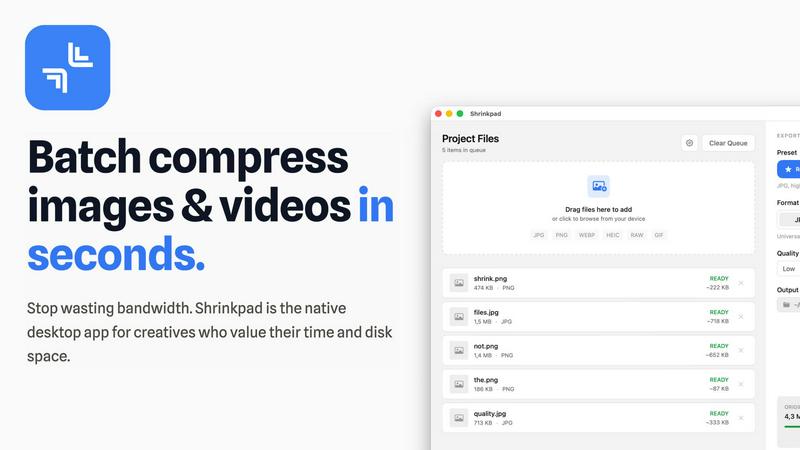
Shrinkpad quickly and effortlessly batch compresses images and videos on Mac, optimizing your assets with precision.
Last updated: February 28, 2026
Visual Comparison
AI Photo Generator

Shrinkpad
Feature Comparison
AI Photo Generator
Ultra-Fast, Multi-Model Generation Engine
At the heart of the platform is an optimized cloud architecture that delivers image generation in seconds, not minutes. Users can select from a vast library of specialized AI models, including Nano Banana Pro, Flux Kontext Max, Ideogram V3, and Midjourney, each fine-tuned for different outcomes like photorealism, character consistency, or specific artistic styles. This allows for precise control over the speed-versus-detail balance, enabling fast A/B testing and campaign ideation cycles without compromising on output quality.
Prompt-to-Masterpiece Text-to-Image
This feature interprets detailed natural language prompts with high accuracy, turning descriptive ideas into fully realized visuals. It is specifically tuned for commercial workflows, offering model presets for advertising, portrait photography, and ecommerce scenes. The AI pays meticulous attention to lighting, composition, and material details, ensuring generated photos like product shots or campaign visuals are realistic and ready for professional use, all from a simple text description.
Reference-Guided Image-to-Image Editing
Beyond text, the platform excels at transforming existing photos. Users can upload a reference image to preserve core elements like structure, identity, or style, and then apply natural language instructions to edit backgrounds, change composition, adjust mood, or swap props. This workflow is essential for maintaining brand consistency, refreshing old assets, or creating cohesive visual sets without starting from scratch for every new piece of content.
Free-First, Browser-Based Editor
The platform offers a completely free-to-start, browser-based AI photo editor online with no installation required. This lowers the barrier to entry, allowing individuals and teams to experiment with prompt strategies, compare different AI models, and refine concepts before committing resources. It supports high-res exports and commercial use rights, providing a genuine, risk-free path to explore and scale professional visual creation.
Shrinkpad
Smart Compression
Shrinkpad automatically analyzes the visual complexity of each file, applying the ideal compression ratio to ensure minimal loss of quality. This feature eliminates the guesswork, allowing users to achieve the best results effortlessly.
Unlimited Batching
With the ability to process thousands of files simultaneously, Shrinkpad can handle massive queues without crashing, unlike many web-based tools. Users can batch compress images and videos together, optimizing their workflow efficiently.
One-Drop Import
Users can simply drag and drop entire folders into Shrinkpad. The application automatically detects all supported media files within the folder, streamlining the process and saving time by avoiding manual file selection.
Privacy-First Approach
Shrinkpad prioritizes user privacy by performing all processing locally on the machine. This means that no files are uploaded to the cloud, ensuring that sensitive assets remain secure and under the user's control throughout the compression process.
Use Cases
AI Photo Generator
Content Creation & Social Media Assets
Creators can rapidly generate unique, copyright-free thumbnails, blog graphics, and social media posts. The ability to quickly iterate on visual concepts for platforms like YouTube, Instagram, and TikTok allows for consistent, high-quality content production that stands out in crowded feeds, all without needing a background in graphic design or photography.
Marketing & Advertising Campaigns
Marketing teams and entrepreneurs can produce stunning, on-brand visuals for ads, website banners, email campaigns, and presentations on a budget. The text-to-image flow is perfect for prototyping product scenes and campaign visuals, while the image-editing capability allows for easy adaptation of core assets across multiple formats and channels for cohesive multi-touch campaigns.
Professional Portrait & Brand Imagery
The platform serves as a powerful AI face generator for building profile-ready portraits, team photos, and character-consistent imagery for personal and corporate brands. Users can transform a simple selfie into a professional LinkedIn headshot or create a series of on-brand character visuals, ensuring a polished and cohesive identity across all professional touchpoints.
Product Photography & Ecommerce
Online sellers and businesses can generate hyper-realistic product photos in various settings and styles without the cost of a professional photoshoot. This includes creating lifestyle images, detail shots, and context scenes for product pages. The AI's attention to realistic lighting and material detail makes products look appealing and trustworthy to potential customers.
Shrinkpad
Photographers
Professional photographers can utilize Shrinkpad to batch compress large collections of images from shoots, significantly reducing file sizes for easier storage and faster uploads to galleries or websites.
Designers
Graphic designers can benefit from Shrinkpad by quickly optimizing assets exported from software like Figma or Photoshop. This allows them to maintain high visual quality while minimizing the impact on disk space and loading times.
Content Creators
Content creators, including vloggers and social media influencers, can use Shrinkpad to compress videos for faster uploads and improved website performance. This tool helps in managing large multimedia files efficiently.
Marketing Teams
Marketing teams can leverage Shrinkpad to ensure that all digital assets, from promotional videos to product images, are optimized for web use. This enhances user experience by reducing website load times and improving engagement metrics.
Overview
About AI Photo Generator
AI Photo Generator (aiphotogenerator.dev) represents the next evolution in creative democratization, transforming the journey from abstract idea to polished visual asset. This industry-leading platform harnesses a suite of advanced neural networks to bridge the gap between imagination and execution, allowing anyone to generate professional-grade digital art from simple text descriptions or existing photos. It is built on the foundational belief that high-end design should be accessible, not gated by technical skill or expensive software. The platform caters to a broad spectrum of users, from individual content creators and marketers to fast-moving entrepreneurial teams, by providing a streamlined, powerful workflow. Its core value proposition lies in delivering ultra-fast, commercially viable, and highly realistic imagery through an intuitive interface, effectively removing traditional barriers to visual production and enabling rapid iteration and scaling of creative projects.
About Shrinkpad
Shrinkpad is an innovative desktop application tailored for macOS users seeking to efficiently batch compress images and videos. This powerful tool empowers photographers, designers, content creators, and anyone handling large media files to streamline their workflows. By allowing users to drop hundreds of files or entire folders, Shrinkpad simplifies the compression process, enabling significant reductions in file sizes within seconds. With a focus on privacy, all processing occurs locally on the user's device, eliminating the need for internet connections and safeguarding sensitive files. Supporting over 50 file formats, including JPG, PNG, MP4, and MOV, Shrinkpad integrates seamlessly into diverse workflows, offering both preset quality options and customizable settings for optimal results. In a world where disk space and loading times are increasingly critical, Shrinkpad becomes an indispensable asset for those looking to optimize their digital content without compromising quality.
Frequently Asked Questions
AI Photo Generator FAQ
What is AI Photo Generator?
AI Photo Generator is an online creative platform that uses advanced artificial intelligence to create high-quality images from text descriptions or by editing existing photos. It is designed to make professional-grade visual creation accessible to everyone, regardless of their design skills, through a fast, browser-based interface.
Is there a free plan?
Yes, AI Photo Generator offers a free-to-start plan that allows users to explore the platform's core features, test different AI models, and generate images without an initial financial commitment. This free plan is intended for experimentation and learning the workflow before scaling up to paid tiers for higher-volume needs.
Can I use the generated images commercially?
Yes, images generated on the platform are typically cleared for commercial use, meaning you can use them in advertising, on websites, in products, and for other business purposes. It is always recommended to review the specific terms of service for the latest information on usage rights.
How does the Image-to-Image editing work?
The Image-to-Image feature allows you to upload a reference photo (like a portrait or product shot). The AI then uses this image as a structural and stylistic baseline. You provide text instructions on what to change (e.g., "change the background to a beach," "make it a cartoon style"), and the AI generates a new image that incorporates your edits while preserving elements from the original.
Shrinkpad FAQ
Can I use Shrinkpad for free?
Yes, Shrinkpad offers a Free Starter plan that includes essential tools for casual use, allowing users to batch compress images with limitations on file counts and formats.
What file formats does Shrinkpad support?
Shrinkpad supports over 50 file formats, including common image formats like JPG and PNG, as well as video formats such as MP4 and MOV, ensuring versatility for various media types.
Does Shrinkpad support video compression?
Absolutely, Shrinkpad includes robust video compression features, allowing users to efficiently reduce the file sizes of videos alongside images in a single batch process.
How many files can I process at once?
With Shrinkpad, users can batch process thousands of files at once, making it a powerful tool for handling large media libraries without compromising performance.
Alternatives
AI Photo Generator Alternatives
AI Photo Generator is a leading platform in the AI image generation category, transforming text prompts and existing photos into professional digital art. It empowers users to create visuals without needing advanced technical skills, making high-end design accessible for a wide range of creative and professional projects. Users often explore alternatives for various reasons, such as seeking different pricing models, specific feature sets like specialized artistic styles, or platforms that integrate better with their existing workflow. The need for a tool that aligns with a particular budget, output quality, or usage frequency is a common driver for comparison. When evaluating other options, consider the core aspects that matter most to your evolution. Look at the quality and accuracy of image generation, the diversity of available styles, processing speed, and the overall user experience. A tool that grows with your creative or business needs, offering both simplicity for beginners and depth for advanced projects, is key to sustained progress.
Shrinkpad Alternatives
Shrinkpad is a powerful desktop application designed specifically for macOS users, allowing them to batch compress images and videos quickly and efficiently. As an essential tool for photographers, designers, and content creators, it optimizes large media files, ensuring significant file size reductions without compromising visual quality. Users often seek alternatives to Shrinkpad for various reasons, such as pricing, feature sets, or compatibility with different operating systems. When searching for alternatives, it's important to consider several factors. Look for user-friendly interfaces, robust batch processing capabilities, customizable settings for compression, and local processing to maintain privacy. Additionally, ensure that the alternative supports a wide range of file formats to seamlessly integrate into your existing workflow.