
RemoveTexts vs Sketch To
Side-by-side comparison to help you choose the right tool.

RemoveTexts
RemoveTexts is an AI tool that effortlessly removes text and watermarks from images in seconds, requiring no design skills.
Last updated: March 11, 2026
Sketch To
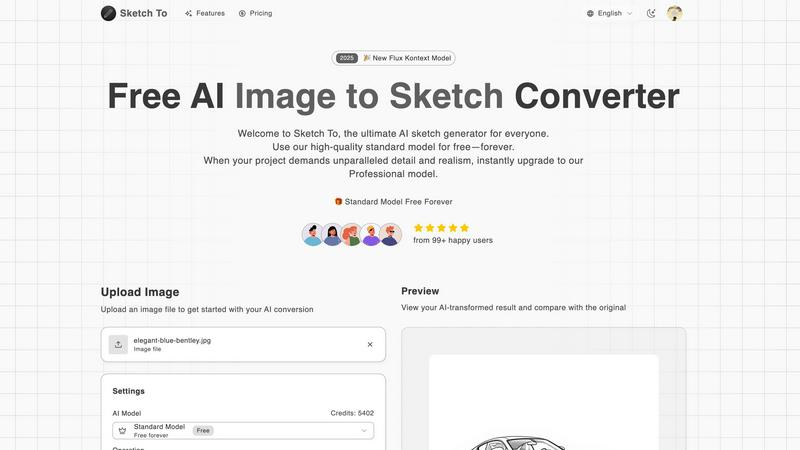
Sketch To transforms your images into stunning sketches with AI, catering to both hobbyists and professionals alike.
Last updated: February 28, 2026
Visual Comparison
RemoveTexts

Sketch To
Feature Comparison
RemoveTexts
Paint to Remove
This feature allows users to have precise control over the text removal process. Simply brush over the specific text areas you want to eliminate, and the AI will intelligently erase only those parts while reconstructing the background seamlessly.
Auto Remove All
For those who prefer a more automated approach, the Auto Remove All feature detects and removes every text element in an image with one click. This is particularly useful for users who want to clean up images quickly without manual selection.
Edit & Replace Text
With this feature, users can easily change existing text in images while matching the original style and font. This provides flexibility for creators who want to customize their visuals without starting from scratch.
Remove Objects
Beyond just text, this feature enables users to erase unwanted objects, logos, and visual elements from their images. This is ideal for enhancing the overall aesthetic of photos or eliminating distractions from the main subject.
Sketch To
Image to Sketch Conversion
Sketch To provides an advanced AI-powered feature that allows users to convert images into beautiful pencil sketches. This tool is designed for artists and designers, enabling them to create artistic interpretations of their photographs effortlessly and with stunning detail. The process is quick and user-friendly, making it perfect for anyone looking to add an artistic touch to their visual projects.
Sketch to Image AI
One of the standout features of Sketch To is its ability to transform sketches into photorealistic images, particularly when utilizing the Professional Model. This feature empowers artists to elevate their hand-drawn sketches into lifelike representations, enhancing their work with incredible detail and texture. This transformation is ideal for professional projects, ensuring that artists can achieve the highest quality results.
Trial Credits Model
New users of Sketch To are welcomed with trial credits, allowing them to explore the platform's capabilities without any financial commitment. The Standard Model is equipped with these credits, making it an excellent choice for hobbyists and casual creators who want to experiment and learn the nuances of digital art. This introductory model fosters a supportive environment for creativity and growth.
Instant Processing
Sketch To prides itself on its powerful AI processing engine, which delivers instant results. Users can upload their images or sketches and receive their transformed creations in just seconds. This feature is crucial for those who need quick turnaround times for projects, whether for social media, presentations, or artistic showcases.
Use Cases
RemoveTexts
Cleaning Up Product Images
E-commerce sellers can use RemoveTexts to quickly eliminate watermarks and unwanted text from their product photos, ensuring clean and professional-looking images that attract buyers and enhance brand credibility.
Redacting Sensitive Information
Legal professionals often need to redact sensitive data from documents. RemoveTexts simplifies this process by allowing users to erase specific text elements from images, ensuring confidentiality while maintaining visual clarity.
Enhancing Social Media Content
Social media managers and content creators can benefit from RemoveTexts by removing distracting captions or watermarks from images, ultimately improving the quality of posts and visual engagement with their audience.
Customizing Memes and Graphics
Memers and graphic designers can use the tool to remove original text from memes or designs, allowing them to create unique variations or add their own messages while preserving the original image quality.
Sketch To
Creative Social Media Posts
Artists and content creators can utilize Sketch To to generate eye-catching social media posts that stand out. By transforming photos into artistic sketches or enhancing sketches into polished images, users can create unique content that engages their audience and showcases their artistic flair.
Educational Projects
Students and educators can leverage Sketch To for school projects that require visual components. Whether creating artistic representations of historical events or illustrating concepts in a visually appealing manner, the tool allows for creativity while ensuring high-quality outputs that enhance learning materials.
Professional Design Work
Graphic designers and professionals can use Sketch To to produce commercial-grade assets. The Professional Model provides the level of detail and realism needed for high-stakes projects, enabling designers to deliver exceptional work that meets client expectations and industry standards.
Personal Artistic Development
For hobbyists and aspiring artists, Sketch To serves as a valuable tool for personal growth in digital art. Users can experiment with different styles and techniques, learning through trial and error while enjoying the creative process. The platform supports artistic exploration, helping individuals develop their unique artistic voice.
Overview
About RemoveTexts
RemoveTexts is an innovative AI-powered image editing tool designed to effortlessly remove unwanted text from images. By leveraging advanced deep learning technology, this tool provides users with a seamless experience in cleaning up visuals without the need for complex software like Photoshop. Whether you are a marketer looking to eliminate watermarks from product images, a creator aiming to clean up memes, or simply someone wanting to remove subtitles or date stamps from photos, RemoveTexts is your go-to solution. The main value proposition lies in its simplicity and efficiency; users can upload their images, select the text they wish to remove, and receive professional-grade results within seconds. With no prior design skills required, RemoveTexts empowers over 100,000 users globally, making it an essential tool for anyone needing fast and reliable image editing capabilities.
About Sketch To
Sketch To represents a groundbreaking advancement in the realm of creative AI tools, providing an intuitive platform that connects the world of imagination with tangible artistic outputs. This web-based AI solution caters to a diverse audience ranging from budding hobbyists to seasoned professionals, enabling users to transform their creative visions into stunning visual representations. At its core, Sketch To specializes in a unique dual-direction transformation: it can convert photographs into intricate artistic sketches and, conversely, breathe life into simple sketches by generating photorealistic images. With a community of over 500,000 users, Sketch To is designed to be accessible and progression-friendly, allowing newcomers to embark on their artistic journey with a robust, free Standard Model that offers trial credits for exploration. As users advance their skills and require more sophisticated results, they can easily transition to the Professional Model, which unlocks unparalleled detail and realism. This tiered approach ensures that Sketch To evolves alongside its users, supporting their creative growth from initial sketches to polished masterpieces without the burden of complex software or restrictive subscriptions.
Frequently Asked Questions
RemoveTexts FAQ
How does RemoveTexts work?
RemoveTexts utilizes advanced deep learning inpainting technology to analyze surrounding pixels and reconstruct the background after removing text. This results in a seamless and professional finish.
Is there a limit on the image size I can upload?
Yes, RemoveTexts supports image uploads in JPG, PNG, and WebP formats, with a maximum file size limit of 10 MB.
Do I need any design skills to use RemoveTexts?
No, RemoveTexts is designed for users of all skill levels. Its intuitive interface allows anyone to remove text and clean images without needing prior design experience.
Can I use RemoveTexts for commercial purposes?
Absolutely. Many users leverage RemoveTexts for commercial projects, including e-commerce, marketing materials, and social media content, making it a versatile tool for various industries.
Sketch To FAQ
What kind of images can I convert with Sketch To?
Sketch To supports various image formats, allowing users to upload photos and sketches for conversion. This flexibility ensures that you can work with the files you already have, making the creative process seamless.
How does the trial credits model work?
New users receive trial credits upon signing up, which they can use to explore the features of the Standard Model. This allows you to test the platform's capabilities without any initial investment, making it accessible for everyone.
Is the Professional Model worth the upgrade?
Yes, the Professional Model unlocks advanced features, including photorealistic sketch transformations, which are crucial for commercial work and professional projects. If you need high-quality results with exceptional detail, upgrading is highly beneficial.
Can I use Sketch To for commercial projects?
Absolutely! Sketch To's Professional Model is designed specifically for commercial use, providing the quality and detail necessary for professional projects. You can confidently create assets for your clients or businesses using this tool.
Alternatives
RemoveTexts Alternatives
RemoveTexts is an innovative AI-powered tool designed for image editing, specifically focused on removing unwanted text from images in a matter of seconds. It streamlines the process of cleaning up visuals by eliminating distractions such as watermarks, subtitles, and branded overlays without the need for complex software like Photoshop. As users increasingly seek efficient solutions for image editing, they often find themselves exploring alternatives due to factors like pricing, user interface, or specific feature sets that may better suit their needs. When searching for an alternative to RemoveTexts, users should consider various aspects such as ease of use, the effectiveness of text removal, and the ability of the tool to maintain image quality. It's also crucial to evaluate the compatibility of the software with different platforms and the support for multiple languages, ensuring that the chosen solution aligns with individual requirements and preferences. A thoughtful selection can enhance the editing experience and yield better results.
Sketch To Alternatives
Sketch To is an innovative web-based AI platform that specializes in transforming images into professional sketches and vice versa. It caters to a diverse user base ranging from hobbyists to professional artists, making it a versatile tool in the creative AI category. Users often seek alternatives to Sketch To for various reasons, including pricing structures, specific feature sets, or compatibility with different devices and operating systems. When searching for an alternative, it's essential to consider factors such as ease of use, the quality of output, and whether the platform supports the creative process at various skill levels. Additionally, potential users should evaluate the flexibility of pricing models, availability of free trials, and the community support surrounding the platform. A tool's ability to adapt to the evolving needs of artists—whether they are just starting or looking to enhance their professional portfolio—can be a critical element in making the right choice. The right alternative should not only meet immediate creative needs but also encourage growth and exploration in the artistic journey.