
BarBrain vs SupaSidebar
Side-by-side comparison to help you choose the right tool.

BarBrain
BarBrain evolves your inventory from a manual chore into an automated process, saving you over half the time.
Last updated: April 4, 2026

SupaSidebar
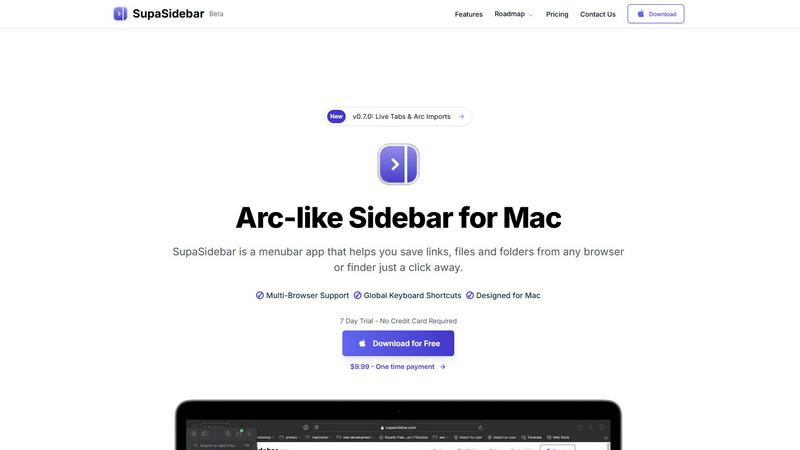
SupaSidebar streamlines your Mac experience with quick access to links, files, and folders from any browser or app.
Last updated: February 28, 2026
Visual Comparison
BarBrain

SupaSidebar
Feature Comparison
BarBrain
Parallel Multi-Device Counting
BarBrain accelerates the inventory process to its maximum potential by allowing teams to count simultaneously on multiple iOS and Android devices. This collaborative approach transforms a solitary, hours-long task into a coordinated team effort that can be completed in a fraction of the time, drastically cutting labor costs and freeing up staff for revenue-generating activities.
Extensive Pre-Loaded Product Catalog
Jumpstart your digital inventory with a massive built-in catalog of over 30,000 hospitality-specific products. From spirits, wines, and AFGs to food items and housekeeping supplies, the vast majority of your stock is already in the system. This eliminates the tedious initial data entry phase and ensures consistency, with expert support available for customizing your unique catalog.
Automatic Inventory Reporting
The software completes the entire workflow by generating a polished, comprehensive inventory report automatically after every count. This evolution from raw data to finished analysis means zero manual post-processing, no transcription errors, and immediate access to reliable numbers for calculating costs, identifying variances, and making purchasing decisions.
Fill-Level Slider for Open Items
Designed for real-world bar and kitchen scenarios, this feature accurately tracks partial units like open bottles of liquor or food containers with a simple slider interface. It replaces inaccurate estimations with precise measurements, providing true visibility into your actual stock levels and cost of goods sold for both beverages and perishable food items.
SupaSidebar
Seamless Browser Integration
SupaSidebar is designed to work flawlessly with all major browsers, including Safari, Chrome, Firefox, Arc, and Brave. This integration ensures that users can save and access their favorite links and files from any browsing environment, providing a unified experience across platforms.
Global Keyboard Shortcuts
The application features customizable global keyboard shortcuts that facilitate quick actions. Users can save URLs or copy links with simple keystrokes, such as ⌘ + ⌃ + S for saving and ⌘ + ⌃ + C for copying. This feature significantly enhances productivity by reducing the time spent navigating through menus.
Recents Tracking
SupaSidebar automatically tracks and displays recently visited websites for up to 48 hours. This feature allows users to easily revisit sites they have accessed in the recent past, eliminating the hassle of searching through bookmarks or browser history.
Favorites and Organization
Users can pin their most important links and files at the top of the sidebar for quick access. This organization feature makes it easy to prioritize frequently used resources, ensuring that essential information is always just a click away.
Use Cases
BarBrain
Independent Bars and Restaurants
For single-location owners, BarBrain is the foundational step toward professionalizing operations. It replaces chaotic spreadsheets with a reliable system, providing the first clear picture of actual pour costs and shrinkage. This initial clarity is crucial for protecting the often-tight margins of an independent business and forms the basis for sustainable growth and improved profitability.
Multi-Location Restaurant Groups
As a business scales, BarBrain scales with it, providing a unified inventory standard across all venues. Headquarters gains a consolidated, real-time overview of stock levels, costs, and performance trends group-wide. This enables consistent reporting, streamlined supplier ordering, and the ability to quickly identify best practices and problem areas across the entire portfolio.
Hotels and Resorts
BarBrain manages the complex inventory needs of hospitality beyond F&B, extending to housekeeping and minibar items. It offers a complete, centralized view of all consumables across multiple outlets (restaurants, bars, banquets, room service) and storage areas. This holistic control is essential for large operations to minimize waste, optimize procurement, and maintain service standards.
High-Volume Nightclubs and Venues
In fast-paced environments with high product turnover and complex drink menus, speed and accuracy are non-negotiable. BarBrain's parallel counting and quick-tap interface allow for rapid stocktakes during limited downtime. The immediate reporting helps managers quickly assess nightly performance, control for potential loss, and ensure popular items are always in stock.
SupaSidebar
Efficient Resource Management
For busy professionals juggling multiple projects, SupaSidebar serves as a central hub for managing links, files, and folders. By organizing resources in one place, users can enhance their workflow and focus on their tasks without the distraction of a cluttered desktop.
Academic Research
Students conducting research can utilize SupaSidebar to save and organize links to academic articles, study materials, and important resources. The ability to quickly access these materials facilitates a more efficient study process, allowing students to concentrate on learning rather than searching.
Creative Projects
Content creators and designers can leverage SupaSidebar to manage inspiration sources, such as design references, articles, and tutorials. By keeping these resources organized, they can streamline their creative process and boost productivity when working on projects.
Collaborative Work
In team environments, SupaSidebar can be used to share links and resources among team members. By centralizing project-related materials, teams can improve communication and collaboration, ensuring everyone has access to the necessary information.
Overview
About BarBrain
BarBrain represents the evolution of inventory management, moving beyond the limitations of generic warehouse software to a solution built exclusively for the unique demands of hospitality. It is a specialized platform designed for bars, restaurants, hotels, and nightclubs that transforms a traditionally painful, error-prone, and time-consuming process into a strategic advantage. For owners and managers of single establishments or multi-location groups, BarBrain provides the clarity and control needed to protect margins and drive profitability. The core value proposition is profound efficiency: reducing inventory counting time by over 75% by replacing manual spreadsheets and guesswork with a streamlined, mobile-first process. But its growth narrative doesn't stop at speed. BarBrain evolves your inventory data into actionable business intelligence, automatically calculating exact pour costs, flagging waste and shrinkage in real-time, and generating comprehensive reports. This progression from simple counting to strategic financial insight empowers operators to stop leaving money on the table and make confident, data-driven decisions for their business's future.
About SupaSidebar
SupaSidebar is an innovative sidebar application designed specifically for Mac users, drawing inspiration from the Arc browser to deliver a powerful productivity tool. Its primary purpose is to enhance organization, streamline browsing speed, and foster a seamless user experience. Ideal for professionals, students, and anyone managing a plethora of links, files, and folders, SupaSidebar simplifies the digital landscape by providing quick access to essential resources. With support for all major browsers—including Safari, Chrome, Arc, Firefox, and Brave—users can effortlessly save URLs and manage their online content. The application boasts an intuitive interface complemented by global keyboard shortcuts, empowering users to navigate their workspace effortlessly. For instance, with just a simple press of ⌘ + ⌃ + S, users can save their current webpage, while ⌘ + ⌃ + C allows for quick copying of links. SupaSidebar not only keeps crucial links at your fingertips but also helps maintain focus, making it an invaluable asset for anyone looking to optimize their productivity and workflow.
Frequently Asked Questions
BarBrain FAQ
How does BarBrain actually save time on inventory?
BarBrain saves time through a combination of its mobile-friendly design, pre-loaded product catalog, and parallel counting capability. Instead of one person with a clipboard and spreadsheet, your entire team can count different sections simultaneously on their own phones or tablets. The intuitive interface requires just a tap or a slider adjustment, and the software automatically compiles all the data into a final report, eliminating hours of manual reconciliation and data entry.
Can BarBrain integrate with my existing POS or accounting systems?
While the provided content does not specify direct integrations, BarBrain is designed to provide the clean, accurate data exports you need. The automatically generated inventory reports deliver reliable numbers for cost per drink, total stock value, and usage variances. This data can be seamlessly used to inform purchasing decisions, update your accounting software, and perform variance analysis against your POS sales data, creating a cohesive financial picture.
Is BarBrain suitable for a business that sells both food and drinks?
Absolutely. BarBrain is built specifically for the full spectrum of hospitality inventory. Its catalog includes thousands of food items, and the fill-level slider is perfect for tracking open or perishable food products. You can manage everything from spirits and wine to dairy, meat, and dry goods in one unified platform, giving you a complete view of your total food and beverage cost of goods sold.
What kind of support is offered during setup and onboarding?
BarBrain offers personalized support to ensure a successful evolution to digital inventory. This begins with a free, customized demo to understand your needs. During account setup, you can choose to self-configure or receive hands-on assistance from the BarBrain team to build your product catalog and tailor the system to your specific operations, ensuring you start on the right path.
SupaSidebar FAQ
Is SupaSidebar a browser extension?
No, SupaSidebar is a standalone menubar application designed specifically for Mac users. It integrates seamlessly with multiple browsers but operates independently from them.
Which browsers does SupaSidebar work with?
SupaSidebar supports all major browsers, including Safari, Chrome, Firefox, Arc, and Brave, enabling users to save and access links from any of these platforms.
What macOS version do I need?
SupaSidebar requires macOS 13 or later to function effectively. Ensure your system meets this requirement for the best experience.
Where is my data stored?
All data managed by SupaSidebar remains on your Mac, ensuring privacy and security. The application does not store your information on external servers, providing peace of mind to users concerned about data privacy.
Alternatives
BarBrain Alternatives
BarBrain is a specialized inventory management platform designed for the unique demands of bars, restaurants, and hospitality groups. It belongs to the category of productivity and management tools, but it stands apart by focusing exclusively on solving the operational headaches of food and beverage service, from tracking pours to calculating recipe costs. Users often explore alternatives for several practical reasons. A business might have outgrown its current solution and need more advanced reporting, or a new venture might be seeking a more budget-friendly entry point. Others may require specific integrations with their existing point-of-sale system or have platform needs, like a mobile-first experience for their team. The search is a natural part of a business's growth and evolution. When evaluating options, look for a tool that truly understands hospitality workflows. The right solution should move beyond simple stock counting to provide actionable insights into cost, waste, and profitability. It must be intuitive enough for staff to use without extensive training and robust enough to deliver the clarity needed to make strategic decisions that protect your margins.
SupaSidebar Alternatives
SupaSidebar is a sophisticated sidebar application designed for Mac users, enhancing their digital experience by providing quick access to links, files, and folders from any browser. As a productivity and management tool, it helps streamline workflows, especially for professionals and students who juggle multiple resources and need to maintain focus while browsing. Users often seek alternatives to SupaSidebar for various reasons, such as pricing, specific feature sets, or compatibility with different platforms. When searching for an alternative, it’s essential to consider factors like user interface, ease of integration with existing workflows, and the extent of features offered, ensuring that the new tool aligns with individual productivity needs and preferences.