
SupaSidebar vs SureThing.io
Side-by-side comparison to help you choose the right tool.

SupaSidebar
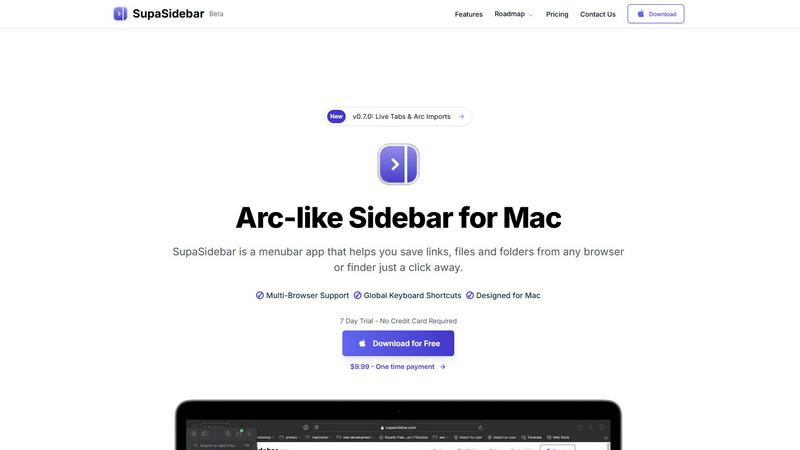
SupaSidebar streamlines your Mac experience with quick access to links, files, and folders from any browser or app.
Last updated: February 28, 2026

SureThing.io
SureThing.io evolves into your trusted partner, autonomously managing tasks while learning your unique business voice over time.
Last updated: March 19, 2026
Visual Comparison
SupaSidebar
SureThing.io

Feature Comparison
SupaSidebar
Seamless Browser Integration
SupaSidebar is designed to work flawlessly with all major browsers, including Safari, Chrome, Firefox, Arc, and Brave. This integration ensures that users can save and access their favorite links and files from any browsing environment, providing a unified experience across platforms.
Global Keyboard Shortcuts
The application features customizable global keyboard shortcuts that facilitate quick actions. Users can save URLs or copy links with simple keystrokes, such as ⌘ + ⌃ + S for saving and ⌘ + ⌃ + C for copying. This feature significantly enhances productivity by reducing the time spent navigating through menus.
Recents Tracking
SupaSidebar automatically tracks and displays recently visited websites for up to 48 hours. This feature allows users to easily revisit sites they have accessed in the recent past, eliminating the hassle of searching through bookmarks or browser history.
Favorites and Organization
Users can pin their most important links and files at the top of the sidebar for quick access. This organization feature makes it easy to prioritize frequently used resources, ensuring that essential information is always just a click away.
SureThing.io
Proactive Autonomous Operation
Unlike tools that sit idle awaiting commands, SureThing.io operates with initiative. It continuously monitors your connected digital environments—like your email inbox—identifies tasks requiring attention, and takes appropriate action. This includes drafting context-aware replies, managing calendar invites based on your priorities, and tracking project milestones, all without you needing to issue a single prompt or reminder.
State-of-the-Art Persistent Memory
This is the foundational feature that enables true partnership. SureThing.io possesses a sophisticated, long-term memory that retains your preferences, communication style, recurring tasks, contact relationships, and overarching goals across weeks and months of interaction. It learns from every action, avoiding past mistakes and continuously refining its understanding of how you work, which means you spend less time giving instructions and more time seeing results.
Enterprise-Grade Security & Reliability
SureThing.io is built for users who need to trust an agent with real, sensitive work. It achieves this with robust security certifications including SOC 2 compliance and Google CASA Tier 2 compliance. This focus on reliability over flashy demos ensures the system is stable, secure, and ready for the complexities of professional use-cases without breaking when faced with real-world tasks.
Cross-App Action & Integration
The agent functions as a central orchestrator for your workflow. It is designed to take action across a suite of connected applications and tools. By operating within your existing ecosystem, it can move information, trigger workflows, and manage tasks seamlessly between platforms, creating a unified and automated operational layer that works on your behalf 24/7.
Use Cases
SupaSidebar
Efficient Resource Management
For busy professionals juggling multiple projects, SupaSidebar serves as a central hub for managing links, files, and folders. By organizing resources in one place, users can enhance their workflow and focus on their tasks without the distraction of a cluttered desktop.
Academic Research
Students conducting research can utilize SupaSidebar to save and organize links to academic articles, study materials, and important resources. The ability to quickly access these materials facilitates a more efficient study process, allowing students to concentrate on learning rather than searching.
Creative Projects
Content creators and designers can leverage SupaSidebar to manage inspiration sources, such as design references, articles, and tutorials. By keeping these resources organized, they can streamline their creative process and boost productivity when working on projects.
Collaborative Work
In team environments, SupaSidebar can be used to share links and resources among team members. By centralizing project-related materials, teams can improve communication and collaboration, ensuring everyone has access to the necessary information.
SureThing.io
The Overwhelmed Executive or Founder
For leaders drowning in email, scheduling, and operational oversight, SureThing.io acts as a chief of staff. It filters the inbox, highlights critical messages, drafts responses in the user's authentic voice, and keeps projects on track. This allows solo founders or executives to execute complex initiatives, like full go-to-market launches, without a large team, effectively multiplying their operational capacity.
The Project & Communication Manager
Professionals juggling multiple ongoing projects with numerous stakeholders benefit immensely. SureThing.io monitors all communication threads, provides updates on project status, reminds team members of deadlines, and ensures nothing falls through the cracks. It maintains context across all conversations, making follow-ups and coordination effortless and systematic.
The Professional Seeking Deep Work Focus
For anyone whose productivity is constantly interrupted by administrative tasks, SureThing.io creates the conditions for uninterrupted focus. By handling the influx of emails, meeting scheduling, and minor task management proactively, it protects the user's calendar and mental space, allowing for sustained periods of deep, strategic work without distraction.
The Security-Conscious Enterprise User
Organizations and individuals handling sensitive information require tools that are both powerful and secure. SureThing.io's enterprise-level security certifications make it a viable option for managing confidential communications, schedules, and projects. Users can delegate operational work to the AI with confidence, knowing their data is protected by industry-leading standards.
Overview
About SupaSidebar
SupaSidebar is an innovative sidebar application designed specifically for Mac users, drawing inspiration from the Arc browser to deliver a powerful productivity tool. Its primary purpose is to enhance organization, streamline browsing speed, and foster a seamless user experience. Ideal for professionals, students, and anyone managing a plethora of links, files, and folders, SupaSidebar simplifies the digital landscape by providing quick access to essential resources. With support for all major browsers—including Safari, Chrome, Arc, Firefox, and Brave—users can effortlessly save URLs and manage their online content. The application boasts an intuitive interface complemented by global keyboard shortcuts, empowering users to navigate their workspace effortlessly. For instance, with just a simple press of ⌘ + ⌃ + S, users can save their current webpage, while ⌘ + ⌃ + C allows for quick copying of links. SupaSidebar not only keeps crucial links at your fingertips but also helps maintain focus, making it an invaluable asset for anyone looking to optimize their productivity and workflow.
About SureThing.io
SureThing.io represents the next evolutionary stage in personal productivity: a truly autonomous AI agent built for reliability. It moves beyond the reactive, session-based limitations of standard chatbots to become a persistent, proactive partner in your work. This agent is designed for professionals, founders, and leaders who are tired of managing their tools and crave a system that manages for them. Its core value proposition is profound simplicity through advanced intelligence—by learning your unique patterns, voice, and goals, SureThing.io handles the operational load of communication, scheduling, and project tracking, freeing you to focus on high-level strategy and creative work. It is engineered not as a demo-grade novelty but as a trustworthy, enterprise-secure system that works continuously, even while you sleep, evolving from a helpful assistant into an integral component of your professional execution.
Frequently Asked Questions
SupaSidebar FAQ
Is SupaSidebar a browser extension?
No, SupaSidebar is a standalone menubar application designed specifically for Mac users. It integrates seamlessly with multiple browsers but operates independently from them.
Which browsers does SupaSidebar work with?
SupaSidebar supports all major browsers, including Safari, Chrome, Firefox, Arc, and Brave, enabling users to save and access links from any of these platforms.
What macOS version do I need?
SupaSidebar requires macOS 13 or later to function effectively. Ensure your system meets this requirement for the best experience.
Where is my data stored?
All data managed by SupaSidebar remains on your Mac, ensuring privacy and security. The application does not store your information on external servers, providing peace of mind to users concerned about data privacy.
SureThing.io FAQ
How is SureThing.io different from a standard AI chatbot?
Standard AI chatbots are reactive tools that respond to specific prompts within a single session, often forgetting context immediately after. SureThing.io is a proactive, autonomous agent with persistent memory. It works continuously in the background, learns your long-term preferences and patterns, takes initiative on tasks, and operates across connected apps, functioning more like a dedicated assistant than a query-based tool.
What does "enterprise-grade security" mean for SureThing.io?
Enterprise-grade security means SureThing.io is built and certified to handle sensitive professional and business data. It is SOC 2 certified, which is an auditing procedure ensuring its service securely manages data to protect the interests of an organization. It is also Google CASA Tier 2 compliant, meeting high standards for security assessment. This makes it suitable for real business use, not just personal experimentation.
How does the "persistent memory" actually work?
SureThing.io's memory is a core AI architecture feature that allows it to retain and recall information from all your interactions. It remembers your stated goals, your communication style and tone, your preferences for scheduling, details about your contacts, and the history of tasks it has performed. This memory evolves over time, meaning the agent gets smarter and requires less explicit instruction the longer you use it.
Can I trust SureThing.io to communicate in my own voice?
Yes, developing an understanding of your unique communication voice is a primary function of its persistent memory. By analyzing your past emails and messages, SureThing.io learns your tone, formality level, common phrases, and stylistic preferences. It then applies this learned model when drafting replies or communications on your behalf, ensuring consistency and authenticity in all its interactions.
Alternatives
SupaSidebar Alternatives
SupaSidebar is a sophisticated sidebar application designed for Mac users, enhancing their digital experience by providing quick access to links, files, and folders from any browser. As a productivity and management tool, it helps streamline workflows, especially for professionals and students who juggle multiple resources and need to maintain focus while browsing. Users often seek alternatives to SupaSidebar for various reasons, such as pricing, specific feature sets, or compatibility with different platforms. When searching for an alternative, it’s essential to consider factors like user interface, ease of integration with existing workflows, and the extent of features offered, ensuring that the new tool aligns with individual productivity needs and preferences.
SureThing.io Alternatives
SureThing.io represents a significant evolution in the AI productivity and management category. It is a fully autonomous business management agent that works proactively on your behalf, learning your patterns and handling tasks like email, scheduling, and project tracking without constant prompting. This shift from reactive chatbots to a persistent, memory-driven assistant defines a new stage in how professionals leverage AI. Users often explore alternatives for several practical reasons. Budget constraints or specific pricing models can be a primary driver. Others may seek different feature integrations, require compatibility with a particular platform ecosystem, or simply want to compare the maturity and reliability of available options before committing. The search for the right tool is a natural part of scaling any operation. When evaluating an alternative, focus on core capabilities beyond basic task automation. Key considerations include the depth of the AI's contextual memory, its ability to operate proactively versus waiting for commands, and the robustness of its security and compliance certifications. The goal is to find a solution that not only automates work but evolves with your business, becoming a more capable partner over time.