
SupaSidebar vs WA Reminders
Side-by-side comparison to help you choose the right tool.

SupaSidebar
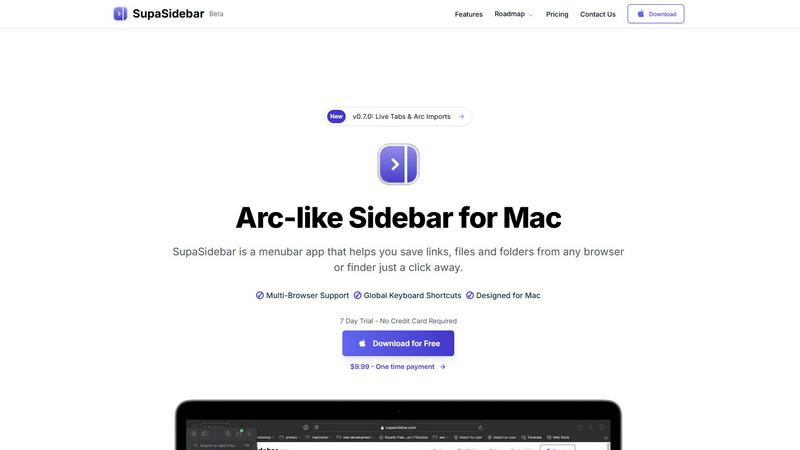
SupaSidebar streamlines your Mac experience with quick access to links, files, and folders from any browser or app.
Last updated: February 28, 2026

WA Reminders
WA Reminders evolves your workflow by scheduling WhatsApp messages from your calendar to save time and ensure timely client communication.
Last updated: April 4, 2026
Visual Comparison
SupaSidebar
WA Reminders

Feature Comparison
SupaSidebar
Seamless Browser Integration
SupaSidebar is designed to work flawlessly with all major browsers, including Safari, Chrome, Firefox, Arc, and Brave. This integration ensures that users can save and access their favorite links and files from any browsing environment, providing a unified experience across platforms.
Global Keyboard Shortcuts
The application features customizable global keyboard shortcuts that facilitate quick actions. Users can save URLs or copy links with simple keystrokes, such as ⌘ + ⌃ + S for saving and ⌘ + ⌃ + C for copying. This feature significantly enhances productivity by reducing the time spent navigating through menus.
Recents Tracking
SupaSidebar automatically tracks and displays recently visited websites for up to 48 hours. This feature allows users to easily revisit sites they have accessed in the recent past, eliminating the hassle of searching through bookmarks or browser history.
Favorites and Organization
Users can pin their most important links and files at the top of the sidebar for quick access. This organization feature makes it easy to prioritize frequently used resources, ensuring that essential information is always just a click away.
WA Reminders
Seamless WhatsApp Integration
Link your existing WhatsApp account in seconds by scanning a secure QR code, similar to WhatsApp Web. This foundational feature ensures all scheduled messages are sent directly from your own phone number or your company's official WhatsApp Business account. It maintains the personal touch and trust of your brand, and because the conversation originates from your number, you can seamlessly continue any dialogue with clients right from your primary WhatsApp app, keeping communication unified and simple.
Dual Scheduling Platforms
Schedule reminders with flexibility through two powerful methods. First, schedule directly from the intuitive WA Reminders app, which automatically imports your full phone contact list to eliminate manual entry errors. Second, schedule effortlessly from Google Calendar by simply adding an internationally formatted phone number to any event's title or description. This dual approach adapts to your preferred workflow, allowing you to manage communications from the center of your operations or directly within your existing calendar ecosystem.
Automated Contact Syncing
Eliminate the tedious and error-prone process of manually typing phone numbers. When scheduling from the WA Reminders app, your device's full contact list is automatically and securely synced. This feature is crucial for efficiency, ensuring you can quickly select clients for reminders without switching between apps or copying data. It supports business growth by removing a significant administrative barrier, allowing you to focus on service delivery rather than data management.
Recurring & Calendar Sync Support
Automate ongoing client engagement with support for recurring messages, scheduled directly from the app or via recurring events in Google Calendar. This is ideal for weekly appointment reminders, monthly payment notifications, or regular follow-ups. The deep integration with Google Calendar also means it works seamlessly with tools like Calendly, creating a powerful, automated scheduling and reminder pipeline that scales effortlessly as your client volume increases.
Use Cases
SupaSidebar
Efficient Resource Management
For busy professionals juggling multiple projects, SupaSidebar serves as a central hub for managing links, files, and folders. By organizing resources in one place, users can enhance their workflow and focus on their tasks without the distraction of a cluttered desktop.
Academic Research
Students conducting research can utilize SupaSidebar to save and organize links to academic articles, study materials, and important resources. The ability to quickly access these materials facilitates a more efficient study process, allowing students to concentrate on learning rather than searching.
Creative Projects
Content creators and designers can leverage SupaSidebar to manage inspiration sources, such as design references, articles, and tutorials. By keeping these resources organized, they can streamline their creative process and boost productivity when working on projects.
Collaborative Work
In team environments, SupaSidebar can be used to share links and resources among team members. By centralizing project-related materials, teams can improve communication and collaboration, ensuring everyone has access to the necessary information.
WA Reminders
Reducing Clinic No-Shows
Medical and wellness clinics can drastically reduce patient no-shows by automating appointment reminders. By scheduling a WhatsApp message to go out 24 hours before an appointment, clinics give patients a convenient, high-open-rate reminder they can instantly confirm or reschedule. This use case recovers lost revenue, optimizes practitioner schedules, and improves patient satisfaction through proactive communication, all managed from the clinic's familiar Google Calendar.
Automating Payment Follow-Ups
Freelancers, coaches, and small service businesses can automate payment reminder sequences. After an invoice is sent, WA Reminders can schedule a polite follow-up message a few days later, ensuring timely payments without awkward manual chasing. This professionalizes cash flow management, saves administrative time, and improves client relationships by providing clear, automated nudges directly through a preferred communication channel.
Managing Small Shop Appointments
Retail shops offering services like repairs, fittings, or consultations can manage bookings and reminders from one place. By integrating with their booking calendar, they can automatically send confirmation and pre-appointment reminder messages via WhatsApp. This reduces missed appointments, improves customer experience, and allows shop staff to focus on in-person service rather than administrative phone calls.
Streamlining Team Client Communication
For small teams, such as in a physiotherapy clinic or a small agency, WA Reminders centralizes client communication. Staff can manage reminders from a shared Google Calendar, ensuring consistent, timely messages are sent from the business's main WhatsApp number. This prevents confusion, ensures brand consistency, and allows any team member to continue conversations, making client management collaborative and efficient.
Pricing Comparison
SupaSidebar
SupaSidebar offers a free version that includes support for all major browsers and three spaces for users to manage their resources. Additionally, there are subscription options available:
- Pro Plan: Available for $19.99 monthly or $13.99 per year, offering unlimited spaces and priority support.
- Lifetime Plan: A one-time purchase of $49.99, allowing indefinite use across five active devices.
Both plans come with a 14-day money-back guarantee, ensuring users can try the service risk-free.
WA Reminders
WA Reminders offers tiered pricing plans designed to support businesses at different stages of growth, from solo professionals to scaling organizations.
Basic Plan - $19 per month
Perfect for solo entrepreneurs and one-person businesses. This plan includes sending up to 200 WhatsApp messages per month from your own number, contact import from your phone, and full sync with Google Calendar including support for recurring events.
Startup Plan - $29 per month
Ideal for small teams or companies with higher communication volume. It includes everything in the Basic plan, with an increased limit of 500 messages per month to support more comprehensive follow-up sequences and campaign management.
Business Plan - $39 per month
Built for medium-sized companies needing to scale reminders across departments. It includes all Startup features with a capacity of 1,000 messages per month, supporting organization-wide client communication and engagement strategies.
All prices are in US dollars and include a 14-day money-back guarantee.
Overview
About SupaSidebar
SupaSidebar is an innovative sidebar application designed specifically for Mac users, drawing inspiration from the Arc browser to deliver a powerful productivity tool. Its primary purpose is to enhance organization, streamline browsing speed, and foster a seamless user experience. Ideal for professionals, students, and anyone managing a plethora of links, files, and folders, SupaSidebar simplifies the digital landscape by providing quick access to essential resources. With support for all major browsers—including Safari, Chrome, Arc, Firefox, and Brave—users can effortlessly save URLs and manage their online content. The application boasts an intuitive interface complemented by global keyboard shortcuts, empowering users to navigate their workspace effortlessly. For instance, with just a simple press of ⌘ + ⌃ + S, users can save their current webpage, while ⌘ + ⌃ + C allows for quick copying of links. SupaSidebar not only keeps crucial links at your fingertips but also helps maintain focus, making it an invaluable asset for anyone looking to optimize their productivity and workflow.
About WA Reminders
WA Reminders is the definitive scheduling solution designed to transform how independent professionals, clinics, and small businesses manage their client communication. It directly addresses the costly problem of missed appointments and inefficient follow-ups by automating WhatsApp messaging. The core value proposition is reclaiming valuable time and boosting revenue by systematically reducing no-shows. The platform evolves with your business, starting with simple one-off reminders and scaling to support complex, recurring communication campaigns. It seamlessly bridges the gap between your scheduling tools and the world's most popular messaging app. By linking directly to your WhatsApp account—either Business or personal—it ensures all messages are delivered from your authentic number, maintaining trust and enabling natural conversation continuation. Whether you are a solo practitioner just establishing your client base or a growing clinic streamlining team workflows, WA Reminders provides the reliable, integrated reminder system essential for professional growth and operational excellence.
Frequently Asked Questions
SupaSidebar FAQ
Is SupaSidebar a browser extension?
No, SupaSidebar is a standalone menubar application designed specifically for Mac users. It integrates seamlessly with multiple browsers but operates independently from them.
Which browsers does SupaSidebar work with?
SupaSidebar supports all major browsers, including Safari, Chrome, Firefox, Arc, and Brave, enabling users to save and access links from any of these platforms.
What macOS version do I need?
SupaSidebar requires macOS 13 or later to function effectively. Ensure your system meets this requirement for the best experience.
Where is my data stored?
All data managed by SupaSidebar remains on your Mac, ensuring privacy and security. The application does not store your information on external servers, providing peace of mind to users concerned about data privacy.
WA Reminders FAQ
Do you offer a free plan?
We do not offer an unlimited free plan due to the significant server costs required to reliably send messages. However, we provide full transparency and confidence with a 14-day money-back guarantee on all paid plans. If WA Reminders is not the right fit for your business within the first two weeks, you can request a full refund, no questions asked.
Can I import or use the contacts from my phone?
Yes, absolutely. When you schedule a message directly from the WA Reminders application, your device's full contact list is automatically and securely imported. This allows you to quickly and easily select recipients without any manual typing, ensuring you never miss a client due to a typo in a phone number.
Can I send reminders directly from Google Calendar?
Yes, this is a core feature. You can schedule a WhatsApp reminder by simply adding an internationally formatted phone number to the title or description of any Google Calendar event. WA Reminders will detect this and automatically send a message at the time you specify, seamlessly integrating reminders into your existing scheduling workflow.
Do you have a Calendly integration?
Yes, WA Reminders integrates with Calendly through Google Calendar. When a client books an appointment via Calendly, it creates an event in your connected Google Calendar. As long as the phone number is included in the event details, WA Reminders will automatically send the scheduled WhatsApp reminder, creating a perfect automated booking-to-reminder system.
Alternatives
SupaSidebar Alternatives
SupaSidebar is a sophisticated sidebar application designed for Mac users, enhancing their digital experience by providing quick access to links, files, and folders from any browser. As a productivity and management tool, it helps streamline workflows, especially for professionals and students who juggle multiple resources and need to maintain focus while browsing. Users often seek alternatives to SupaSidebar for various reasons, such as pricing, specific feature sets, or compatibility with different platforms. When searching for an alternative, it’s essential to consider factors like user interface, ease of integration with existing workflows, and the extent of features offered, ensuring that the new tool aligns with individual productivity needs and preferences.
WA Reminders Alternatives
WA Reminders is a productivity tool designed for appointment-based businesses, allowing them to automate WhatsApp message scheduling to reduce no-shows. As businesses grow, their needs evolve, and users often explore alternatives for various reasons. This could be due to budget constraints, a need for more advanced features like multi-platform messaging, or simply a requirement for a different user interface that better fits their operational workflow. When evaluating other solutions, it's crucial to consider your business's current stage and future trajectory. Look for a tool that not only handles core scheduling reliably but also scales with you. Key factors include integration capabilities with your existing calendar system, the security of client data, and whether the platform supports the communication channels your customers prefer. The right choice should streamline your reminders, not complicate them.