

SlabCalc
SlabCalc evolves from basic concrete calculators into an AI-powered tool that diagnoses cracks, analyzes quotes, and guides your project from.
About SlabCalc
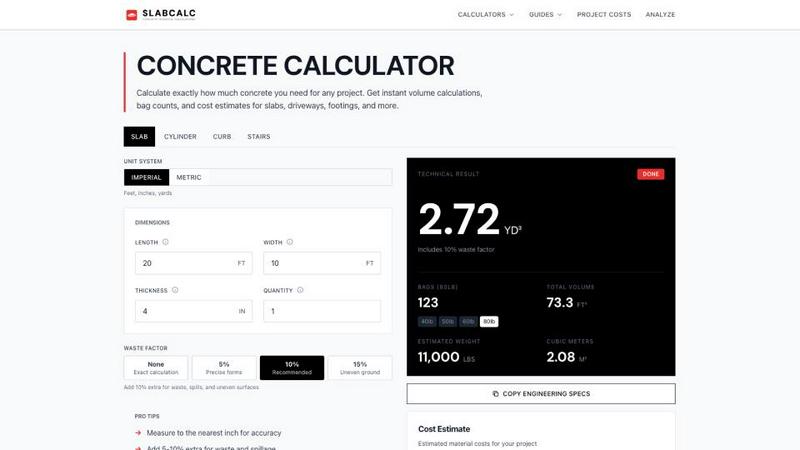
SlabCalc is a comprehensive, free, and no-signup suite of concrete tools designed to transform how contractors, builders, and DIYers plan and execute their concrete projects. At its core, the platform houses 34 specialized calculators covering virtually every concrete application imaginable, from slabs and driveways to footings, foundations, CMU block walls, columns, curbs, stairs, sonotubes, rebar, gravel, garage floors, and basement floors. Each calculator delivers instant, precise results including volume in cubic yards and cubic meters, pre-mix bag counts for 40, 50, 60, and 80 pound bags, total weight, and a detailed cost estimate. Users can adjust a waste factor and toggle between imperial and metric units with a single click. Beyond estimation, SlabCalc introduces groundbreaking AI-powered tools: a Concrete Crack Analyzer that diagnoses damage from a photo, providing failure mode identification, severity rating on a 1 to 5 scale, and actionable DIY or engineer advice, and a Quote Analyzer that breaks down contractor bids into labor, materials, and site preparation costs while flagging potential red flags. The platform rounds out its offering with cost by city pricing pages, expert guides, a concrete glossary, a Chrome extension, and embeddable widgets. SlabCalc is a one stop platform for concrete planning, evolving from a simple calculator into an intelligent assistant that guides users through the entire project lifecycle, from initial estimation through final execution.
Features
34 Specialized Concrete Calculators
SlabCalc provides 34 dedicated calculators for every concrete shape and project type, including slabs, cylinders, curbs, stairs, columns, walls, footings, circles, and tubes. Each calculator returns volume in cubic yards and cubic meters, pre-mix bag counts for 40, 50, 60, and 80 pound bags, total weight, and a cost estimate. Users can adjust waste factors from 0 to 15 percent and toggle between imperial and metric units. The calculators include pre configured defaults for specific project types, such as cinder block walls, basement floors, deck footings, and garage slabs, making it easy to get accurate results quickly without manual formula entry.
AI Powered Concrete Crack Analyzer
The Concrete Crack Analyzer is an advanced AI tool that diagnoses concrete damage from a single photograph. Users upload a photo of the crack, and the analyzer identifies the failure mode, such as shrinkage, settlement, or structural overload. It then assigns a severity rating from 1 to 5, with 1 being minor cosmetic damage and 5 indicating critical structural risk. Finally, the tool provides tailored advice on whether the issue is a DIY repair or requires a professional structural engineer. This feature empowers users to make informed decisions about repairs and maintenance, saving time and money by avoiding unnecessary professional calls.
AI Quote Analyzer for Contractor Bids
The Quote Analyzer is an intelligent tool that breaks down a contractor's bid into three core categories: labor, materials, and site preparation. It analyzes the line items and flags potential red flags, such as inflated material costs, vague labor estimates, or missing scope items. The tool provides a clear, easy to understand breakdown that helps users compare bids, negotiate fair pricing, and avoid common pitfalls. This feature is particularly valuable for homeowners and small contractors who may not have deep experience with construction pricing, giving them confidence that they are getting a fair deal.
Comprehensive Project Cost Data and Guides
SlabCalc includes cost by city pricing pages that provide localized estimates for concrete materials, ready-mix delivery, and professional installation. Users can access expert guides covering topics like standard slab thickness, the 10 percent waste rule, and bagged versus ready-mix concrete. The platform also features a concrete glossary, a Chrome extension for quick access, and embeddable widgets for contractors who want to integrate calculators into their own websites. These resources evolve with the user, from a beginner learning the basics to a professional refining their estimates with localized data.
Use Cases
Homeowner Planning a Patio or Driveway
A homeowner planning a new patio or driveway uses SlabCalc to calculate the exact volume of concrete needed for a 20 by 20 foot slab at 4 inches thick. The calculator returns 2.47 cubic yards, recommends 113 bags of 80 pound concrete, and provides a cost estimate for bagged concrete, ready-mix, and professional installation. The homeowner toggles the waste factor to 10 percent and reviews the cost by city page to understand local pricing. They then use the Quote Analyzer to evaluate bids from contractors, ensuring they are not overcharged for materials or labor.
Contractor Estimating a Commercial Foundation
A contractor working on a commercial foundation project uses SlabCalc to calculate concrete for multiple footings, columns, and walls. They input dimensions in imperial units, adjust the waste factor to 5 percent for precise forms, and generate a detailed technical result with cubic yards, bag counts, and weight. The contractor copies the engineering specs for submittal and uses the embeddable widget to share calculations with their team. They also consult the expert guides on standard slab thickness and rebar reinforcement to ensure the foundation meets structural requirements.
DIYer Repairing a Cracked Garage Floor
A DIYer notices a crack in their garage floor and uses the AI Concrete Crack Analyzer to diagnose the issue. They upload a photo, and the analyzer identifies the crack as shrinkage with a severity rating of 2. The tool provides DIY advice for filling the crack with epoxy and recommends monitoring for further movement. The DIYer then uses the slab calculator to estimate the volume of concrete needed for a small repair patch, orders the correct number of bags, and completes the repair with confidence, avoiding an unnecessary call to an engineer.
Builder Comparing Material Costs for Multiple Projects
A builder managing multiple projects uses SlabCalc to compare costs between bagged concrete and ready-mix for each job. For a small deck footing project under 1 cubic yard, the calculator recommends bagged concrete and provides bag counts and costs. For a larger basement floor project over 4 cubic yards, it recommends ready-mix and shows the cost per cubic yard with delivery. The builder uses the cost by city pages to adjust estimates for different locations and the Quote Analyzer to evaluate subcontractor bids, ensuring each project stays within budget.
Frequently Asked Questions
How do I calculate the amount of concrete needed for a slab?
To calculate concrete for a rectangular slab, use the formula: Length in feet times Width in feet times Thickness in feet divided by 27 equals Cubic Yards. Convert thickness from inches to feet by dividing by 12. For example, a 10 by 10 foot slab at 4 inches thick is 10 times 10 times 0.333 divided by 27, which equals 0.62 cubic yards. SlabCalc automates this calculation and also provides bag counts, weight, and cost estimates with adjustable waste factors.
What is the difference between bagged concrete and ready-mix?
Bagged concrete is pre-mixed and sold in 40, 50, 60, or 80 pound bags at hardware stores. It is practical for projects under 1 cubic yard because it requires no truck coordination and can be mixed on site. Ready-mix concrete is delivered by truck from a plant and is faster, cheaper per unit, and more consistent for projects over 1 cubic yard. SlabCalc automatically recommends which option is best based on your calculated volume.
How much waste factor should I add to my concrete order?
SlabCalc recommends adding 10 percent extra concrete to your calculated volume to account for subgrade irregularities, spills, and slight over-excavation. For precise forms with even ground, 5 percent may be sufficient. For uneven ground or complex shapes, 15 percent is recommended. Running short on a pour is expensive because the truck must return and a cold joint is difficult to repair. The calculator includes preset waste factors of 0, 5, 10, and 15 percent for easy selection.
Is SlabCalc really free with no signup required?
Yes, SlabCalc is completely free and requires no signup or account creation. You can calculate unlimited projects with full access to all 34 calculators, the AI Crack Analyzer, the AI Quote Analyzer, cost by city pages, expert guides, and the concrete glossary. There are no hidden fees, premium tiers, or limitations on usage. The platform is supported through optional embedded widgets and the Chrome extension, which are also free to use.
Similar to SlabCalc

nanobanana 21
Fast, simple image studio powered by Nano Banana 2.1: accurate details, readable text, consistent characters, up to 14 reference images.

EditTextPhoto
AI-powered image text editor to edit, replace, fix, or translate text in images while preserving the original font, color, size, and style.

Remove Text
Remove text from images online with AI

Image to Layers AI
Turn any image into editable transparent PNG/PSD layers with AI

GetYouTubeTranscript
Free YouTube transcripts on the web, a Chrome extension, and an API + MCP server so AI assistants can read YouTube.

Qwen Image Edit
Prompt-based Qwen Image editing and generation for backgrounds, text, products, posters, outpainting, and creative styles.

Presentation Intelligence
AI-native presentation and visual content platform that turns prompts, documents, images, videos, and data into polished, shareable decks.
Text Logo
Create a custom text logo, wordmark logo, or typography logo with editable fonts, colors, icons, shapes, and flexible export formats.